Specify intersection elements in any of these ways:
- Click in the drawing.
- Specify two points
- Identify an element and shift it by an offset value.
- Specify point and orientation.
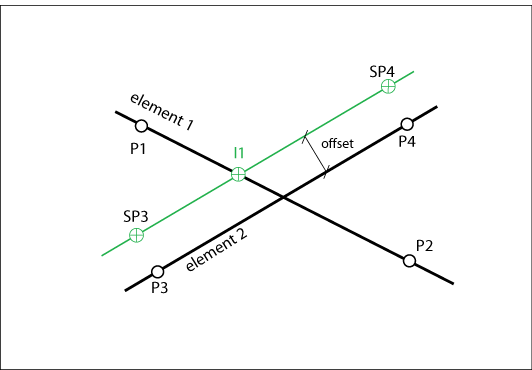
Intersection Elements
Use the dialog box to modify the parameters.
|
Element |
Description |
|
Element 1 Element 2 |
Element 1 and 2 can be a straight line or a circular arc. Click Click Specify an offset value to shift the element. Specify an azimuth value to rotate the element. |
|
Point 1 Point 2 |
The orientation of element 1 is indicated by the direction of Point 1 and Point 2. |
|
Point 3 Point 4 |
The orientation of element 2 is indicated by the direction of Point 3 and Point 4. |
|
Easting Northing Elevation |
Coordinates of the points. You can edit the coordinates or use |
|
Radius |
Modify as needed. Use |
|
Azimuth |
Use the azimuth to rotate the element. For tangents the azimuth value specifies in which quadrant the result is located. Use |
|
Intersection 1 Intersection 2 |
Intersections with arcs have more than one result. Use the Tangentials For tangentials, if you define tangents, you can specify a radius. Enter 0 or leave the field empty to calculate a straight line. If you define a radius you can use the Show Next |
 to show the element in the drawing.
  to identify another element in the drawing.
  to switch between long arc and short arc.