The first step in modeling a family mold is to import the first model that is to be included.
Note: Before developing a family mold, it is important that for each model:
- The gate location has been optimized.
- The melt and mold temperatures specified in the process settings, as well as the molding window, is comparable for all models.
- Click
 . The Create New Project dialog appears.
 - Enter family in the Project name text-box.
- Click OK.
- Select
 . The Import wizard-Model selection dialog appears.
 - Click
 Browse and navigate to the Autodesk Moldflow Adviser tutorial files (typically
C:\Users\Public\Public Documents\Autodesk\Moldflow Adviser xxxx\tutorials
).
Browse and navigate to the Autodesk Moldflow Adviser tutorial files (typically
C:\Users\Public\Public Documents\Autodesk\Moldflow Adviser xxxx\tutorials
). - Select mouse_top.stl and then click Open.
- Step through the Import Wizard dialog, accepting the defaults.
- Right-click on mouse_top_study in the Project View pane and select Rename from the menu that appears.
- Enter mouse_family in the text-box, then press Enter to accept the change.
- Rotate the model to investigate the model geometry.
- Click
 and click on the model to set the location as shown.
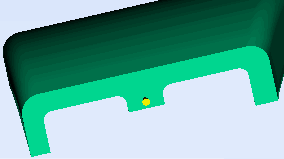
- Right-click in the Model pane and select Finish Set Injection Locations from the context menu.
- Right-click on the injection location and select Properties from the context menu. The Edit properties dialog appears.
- Enter the following coordinates in the relevant text box:
Y: 45
Z: 28
Note: The X value should not be changed here, as the injection point is on a YZ plane that is important to the final family mold. - Click Apply, and then Close to exit the Edit properties dialog.
In the next task you will add the second model.