Create animation cycles using the Cycle Creator
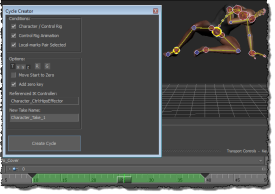
A new Cycle Creator tool lets you automatically generate an animation cycle from marked start and end frames of animated segment in the timeline. The animation cycle is saved as a new take.
Before using Cycle Creator tool, you must:
- Select your character in the Character Controls window.
- Have an animated control rig set as the Source for your character.
- Use Local Marks to set the first and last frames of the animated segment you want to generate the cycle from.
See Create animation cycles using the Cylce Creator tool and Cycle Creator tool.
Spline IK constraint
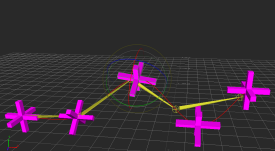
A new Spline IK constraint lets you constrain skeleton bones to a 3D curves. You can then manipulate the curve to pose the skeleton bones as well use the constraint's Twist Interpolation options. Use Spline IK constraints for animating character tails, ropes, and more.
To use a Spline IK constraint, the bones must be perpendicular to the Y-axis. While manipulating the constraint, the bone length remains fixed, meaning there is no stretching in the joints or bones. For constraining the bones, you can import a custom spline 3D curve into your scene, or use the 3D Curve in the Elements folder of the Asset Browser.
Cycle Analysis
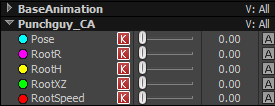
MotionBuilder 2017 lets you analyze FCurve animation data so you can choose the best start and end points when creating loops. You can use Cycle Analysis to analyze animation data from different input sources including control rigs, characters driven by Flex Mocap, and skeletons driven by an Actor.
Cycle Analysis lets you compare FCurve data based the following parameters:
- Pose—as a relative difference in percent or absolute difference in degrees.
- Root rotation—as a relative difference in percent or absolute difference in centimeters.
- Root height—as a relative difference in percent or absolute difference in degrees.
- Root X and Z direction—as a relative difference in percent or absolute difference in degrees.
- Root speed—as a relative difference in percent or absolute difference in centimeters per-second.
You can analyze data while scrubbing the Timeline by turning on Realtime in the Properties pane.
The Cycle Analysis data can be saved to a file, and is both Take and Character dependent.
Editable motion trails
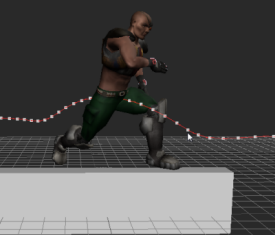
MotionBuilder now includes editable motion trails based on the trajectory view of animated objects. Edits between the motion trail and the animation curve are synchronized so that any edits you make to the FCurve, including the merged result of animation layers updates the motion trail.
Add and control fall off for F-Curves
Use the new Fall Off Radius to create fall off on both sides of a selected area of an FCurve. For example, setting Fall Off Radius to a value of 10 creates 10 frames of fall off before and after the selected area.
Relative cycle
A new Relative Repetition option has been added to the Extrapolation Options for FCurves. You can use this option to make the Pre-Extrapolation and Post Extrapolation increments relative to the last cycle in the curve. You can turn on a new Infinite option to extend the cycle of the pre and post extrapolation to the full duration of the animation.
Extended use of the Default Keying Group
You can now set Use Default Keying Group on all MotionBuilder objects not just characters. For example, you can now create a custom keying group that contains the weight property of a constraint.
Create poses with non-model objects
Poses can now be created with objects that are not models. This changes the previous ways that layers are selected and how you work with custom keying groups. For example:
- By default, layers are not selected at the component level, meaning that they will not be displayed in the property view by default. This allows you to create a pose of a non-model object without always having the layer in it. Also, layers do not appear when parsing selected objects with the SDK.
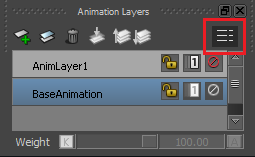
- In the
Animation Layers window, click this
 icon in the
Animation Layers window to change the way the layer is selected.
icon in the
Animation Layers window to change the way the layer is selected.
- Custom keying group can now be created with objects that are not models, such as a constraint.
This let you create a custom property on a constraint. Then, a custom keying group can be created to key that custom property on the constraint. A pose of the custom property on the constraint can also be copied and pasted.