Click Play
 to see a looping animation of the simulation results, with color changes to indicate the extent of displacement or temperature change as the part is built. On a drop-down menu, you can select x2, x4 or x8 to increase the play speed by multiples. Click Play again at any time to stop the action.
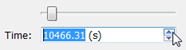
On the time slider, you can also click and drag the marker back and forth to review specific parts of the animation, or use the Up and Down arrows to step forward or back through the animation.