There are four automated methods to close holes, avoiding the need to create the necessary triangles manually.
 The context menu of an open triangle border edge has the option Close Hole the context menu. This closes individual holes and leaves inserted triangles selected. Open triangle edges are highlighted in yellow. This can be toggled in the Status tabsheet.
 Close trivial holes repairs all instances of holes missing a single triangle only, or having two triangle border edges meet without being defined as common edge
 Close defined holes offers to specify minimum and maximum values for border length so as to restrict the size of holes to be fixed.
 Close all holes is a blanket function to fix any holes available. This is the quickest and easiest way but may not handle all holes properly, especially in cases where holes are surrounded by rather complex geometry.
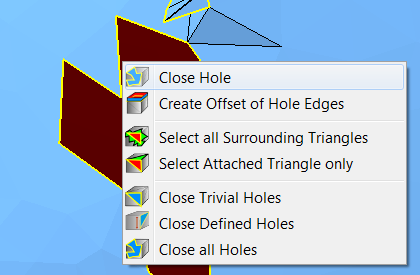
You can close single holes from the context menu of a border edge.
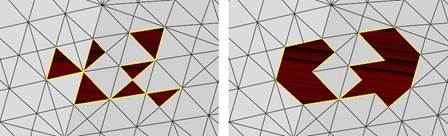
Left: For these holes only one triangle is missing. They can be repaired with Close Trivial Holes. Right: Close All Holes automatically tries to repair all holes, no matter how complex they are.