 The feature Wrap part surface is available in the Repair menu. It creates one shell from the surface that is accessible from outside and deletes meshes and triangles that are inside. That is a very helpful tool if you want to get rid of the interior shells. For example, if you want to print a model of a house and don’t need the walls inside, you just use Wrap and then only print the outer walls and the roof, save material and make the whole job a lot less error-prone.
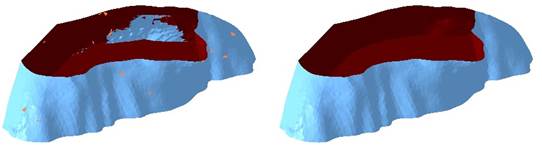
Left: Part with interior shells. Right: Part after the wrap, only the outer shell remains.
In some cases Wrap will take a very long time or even not finish at all. Some parts have areas where a lot of triangles are self-intersecting in high density on a small area. As the wrap has to recalculate each of these individually, the operation might take extremely long or break down entirely. In this case you should perform the action Remove Problem Areas. It will scan the part for such areas and remove the intersecting triangles. This might cause new holes however, which have to be closed. After that the wrap should perform much better. The action can be found in the toolbar under Repair.