This feature allows you to apply offsets to selective areas of the part. To do so use the selection tools to define the area which shall be offset. Then go to mesh edit and choose the selective offset. Here you set the offset distance along with the fallout distance. The fallout distance chooses which area around the selected triangles should be affected by the operation and will move up to the offset by creating a slope. You can select a soft and a hard offset, which will affect how smooth the corners of the slope are going to be.
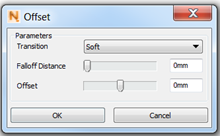
The offset option can be found under mesh edit, selective offsets