 The platform overview can be obtained by pressing F5 or is available in the Edit menu or in the toolbar. It displays a window with an overview of all parts in the project, including part number (ID) status, length, width, height, volume, area, number of triangles, edges and points of the parts.
Also, the total size, volume and area of the parts and the filling degree of the platform are displayed. If the box Selected Parts Only at the bottom of the dialog is ticked, unselected parts are not listed.
This data can be exported and saved as a CSV file. In the bottom left of the dialog, you tick a box to export only a list of the file names without any additional information. Target directory and file name can be chosen in a browser window.
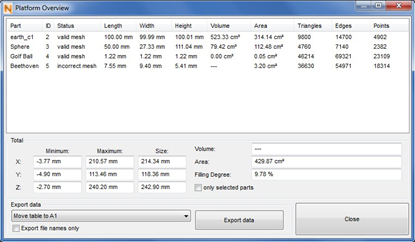
Information about the parts in the platform are provided in a dialog box. They can be exported as .csv file.