 With this function, adjacent triangles are connected. Therefore, points of triangles in an identical position and the adjacent edges are merged. These edges are marked yellow, if the option Highlight Holes in the tabsheet is activated. Whenever the corners of triangles are not exactly in an identical position, they are moved together. Thereby, the shape of the part is distorted very slightly. Here, the tolerance setting determines the maximum distance corners are moved. The stitching of triangles can either be executed only with selected triangles or with all triangles. If you stitch only selected triangles, both triangles which are to be connected have to be selected.
Optionally, you can ignore the orientation of triangles. If you do so, triangles with opposing orientation will be connected as well. If you do not tick this box, the software stitches only triangle edges with fitting orientation. In general, it is recommended NOT to ignore the orientation, in order to prevent the creation of non-orientable triangle meshes.
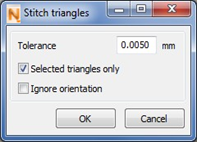
Open triangle edges can be repaired with the Stitch Triangles function.