Netfabb does not take the actual contour of parts into account for some operations, but it orientates according to the part's outbox. The outbox is being displayed as green edges on the corners around the part. It is a virtual box the part fits in. The size of the outbox is therefore dependent on the part's orientation.
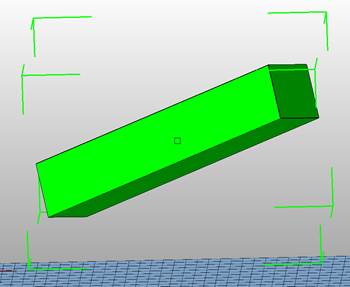
Primitive, that is surrounded by a pretty large outbox due to its orientation.
For these operations, that take the outbox into account a smaller outbox is beneficial. The tool Minimize outbox rotates the part with regards to the set parameters to achieve the smallest possible outbox. You can access it either through the context menu that opens by right clicking on the part under Extended, Minimize outbox, or through the toolbar under Part, Minimize outbox. The dialogue will give you additional options which will affect the parts’ rotation during the minimization. You minimize the outbox to reach a minimal volume, base area or height and base area. By choosing the volume option you can also toggle whether the part shall be orientated flat. By choosing the minimal base area you can also limit the rotation to the z-axis. In addition to these options you can check the option to place the part on the platform. After setting all the options, you can click on Start minimization.
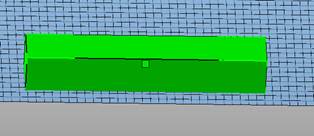
The same primitive as above but with a minimized outbox and placed on the platform.
In the Large Packing version, there’s also a Data API to save and open packed build spaces in a network and an integration of an ERP System. Manuals and support on this are provided upon request.