 After activating the mode selection primitive in the toolbar, you can select all triangles or shell within a rectangular or circular frame by holding the left mouse button and dragging the frame. Choose between the four different modes of selecting:
Select all triangles: All triangles that lie within the rectangle, no matter if they are at the backside of the part or covered by another surface, will be selected.
Select front-facing triangles only: Triangles that face to the front will be selected, even if they are covered by other surfaces.
Select uncovered triangles only: Triangles, which face to the front or back and that are not covered by other surfaces will be selected.
Select front-facing and uncovered triangles only: Only those triangles that you can actually see from your current perspective and are facing to you will be selected.
Whole Shells also allows you to use the rectangle to select whole shells instead of just triangles.
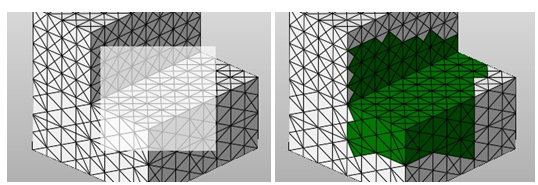
Left: Drag a rectangle with the mouse. Right: The resulting selection.
 Additionally, there are three default selections available in the toolbar or in the part's context menu. They select either all triangles, toggle the selection, which means that selected triangles are deselected and deselected triangles are selected at the same time, or clear the selection, with all triangles becoming deselected.