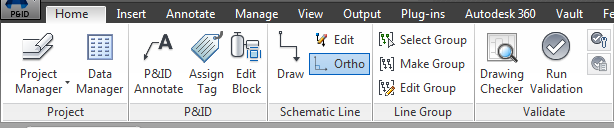
The ribbon is composed of a series of panels that are organized into tabs labeled by task. Ribbon panels contain many of the same tools and controls available in toolbars and dialog boxes. By default, the ribbon is displayed horizontally at the top of the drawing window when you create or open a drawing.
If you drag a panel from a ribbon tab and into the drawing area or onto another monitor, that panel remains where you placed it. The panel remains open until you return it to the ribbon, even if you switch ribbon tabs.
P&ID Home Tab
The P&ID Home tab displays options for working with P&ID drawings. This tab includes the following panels:
- Project panel
- P&ID panel
- Schematic Line panel
- Line Group panel
- Validate panel
- Layers panel
- Block panel
- Annotation panel
- Properties panel
- View panel
- Utilities panel
The P&ID Home tab is part of the P&ID PIP, P&ID ISO, P&ID ISA, P&ID DIN, and P&ID JIS/ISO workspaces.