The Connectivity rule defines whether to allow connection. If no connectivity rule is defined, it defaults to allow connection.
For example, following procedure defines streetlight conductor is allowed to connect to streetlight conductor but not primary or service conductors.
- Click Configuration tab
 Setup panelManage Rules.
 - Navigate to ConnectivityElectricPointLight.
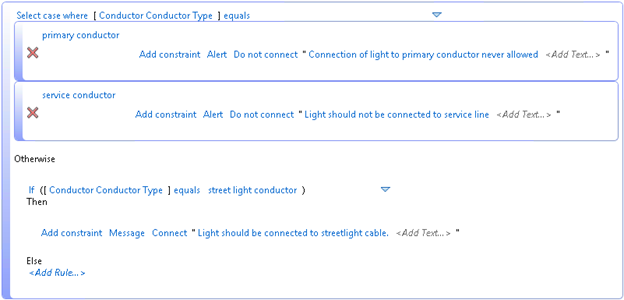
- Click Create Rule and then write a rule as below. Note that the constraint type is "Alert" for primary conductor and service conductor.
- Click Home tabElectric Underground panelDraw UndergroundDraw Primary Line With Duct, and draw a line.
- Open Design ExplorerModel ViewerElectric Light, and select a model.
- When move the mouse close to the primary conductor, you will see no Connect To icon
 shows on the Connection Tooltip and an alert with the configured message shows.
- Place the light at the end of the primary conductor.
- Open Feature Info and select the light and conductor.
- Click the besides light, you will find that the Disallow Connect icon
 shows before the conductor, and the connection is not allowed either. The tooltip shows the same alert message.
- Draw a streetlight conductor.
- Place a light and move the mouse close to the end of the conductor. The Connect To icon shows on the Connection Tooltip which means the connection is allowed.
