これから作成するダイアログ ボックスは、次のようなものです。
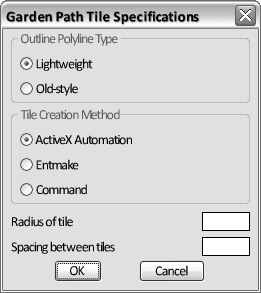
このダイアログ ボックスには、次の要素が含まれています。
- 2 組のラジオ ボタン。
一方の組のボタンは、境界のポリラインのスタイルを決定します。もう一方の組のボタンは、図形作成方法(ActiveX、entmake、または command)を指定します。同じ組のラジオ ボタンで、オンに設定できるのは一度に 1 つだけです。
- タイルの半径を指定するための編集ボックス、およびタイルの間隔を指定するための編集ボックス。
- [OK]ボタンと[キャンセル]ボタンの標準セット。
ダイアログ ボックスの構成要素は、DCL 内で タイル として参照されます。ダイアログ ボックス DCL ファイルの内容を、いきなり完全に書こうとすると、閉口するかもしれません。要領は、まず概観をスケッチし、それをいくつかのセクションに分け、それから各セクションを書くことです。
ダイアログ ボックスを定義するには
- Visual LISP テキスト エディタ ウィンドウで、新しいファイルを開きます。
- 新しいファイルに、次のテキストを入力します。
label = "Garden Path Tile Specifications";
この DCL ステートメントは、ダイアログ ボックス ウィンドウのタイトルを定義しています。
- 次のコードを入力することにより、ポリラインのタイプを指定するラジオ ボタンを定義します。
: boxed_radio_column {    // defines the radio button areas
  label = "Outline Polyline Type";
  : radio_button {        // defines the lightweight radio button
    label = "&Lightweight";
    key = "gp_lw";
    value = "1";
   }
: radio_button {       // defines the old-style polyline radio button
  label = "&Old-style";
  key = "gp_hw";
 }
}
DCL 指示子 boxed_radio_column により、グループ ボックスの境界が定義され、ボタンのセットへのラベル付けが可能になります。指示子 radio_button を追加することにより、必要なラジオ ボタンを、境界内に指定します。各ラジオ ボタンには、ラベルと キーが必要です。キーは、AutoLISP コードがそのボタンを参照するときに使用する名前です。
「lightweight」というラベルのラジオ ボタンに、値 1 が割り当てられていることに注意してください。ボタンに値 1(整数ではなく文字列)を割り当てると、ボタン列内で、そのボタンが既定でオンになります。つまり、ダイアログが最初に表示されたとき、このボタンがオンになります。AutoLISP ではセミコロンがコメントでしたが、DCL ファイルではダブルスラッシュがコメントを表すことにも注意してください。
- 次のコードを追加して、図形作成スタイルを選択するためのラジオ列を定義します。
: boxed_radio_column { // defines the radio button areas label = "Tile Creation Method"; : radio_button { // defines the ActiveX radio button label = "&ActiveX Automation"; key = "gp_actx"; value = "1"; } : radio_button { // defines the (entmake) radio button label = "&Entmake"; key = "gp_emake"; } : radio_button { // defines the (command) radio button label = "&Command"; key = "gp_cmd"; } } - 次のコードを追加して、タイルのサイズと間隔を指定するためにユーザが数値を入力する編集ボックス タイルを定義します。
: edit_box {      // defines the Radius of Tile edit box
  label = "&Radius of tile";
  key = "gp_trad";
  edit_width = 6;
}
: edit_box {      // defines the Spacing Between Tiles edit box
  label = "S&pacing between tiles";
  key = "gp_spac";
  edit_width = 6;
}
この定義で、編集ボックスの初期値を設定していないことに注意してください。各編集ボックスの初期値は、AutoLISP プログラムで設定することになります。
- [OK]ボタンと[キャンセル]ボタンのために、次のコードを追加します。
: row {          // defines the OK/Cancel button row
  : spacer { width = 1; }
  : button {    // defines the OK button
    label = "OK";
    is_default = true;
    key = "accept";
    width = 8;
    fixed_width = true;
  }
  : button {    // defines the Cancel button
    label = "Cancel";
    is_cancel = true;
    key = "cancel";
    width = 8;
    fixed_width = true;
  }
  : spacer { width = 1;}
}
両方のボタンは行内に定義されているので、水平に整列されます。
- テキスト エディタ ウィンドウの先頭にスクロールし、DCL の先頭行に次のステートメントを挿入します。
gp_mainDialog : dialog { - 指示子 dialog には閉じ括弧が必要なので、ファイルの最後にスクロールし、DCL コードの最終行に括弧を追加します。
}