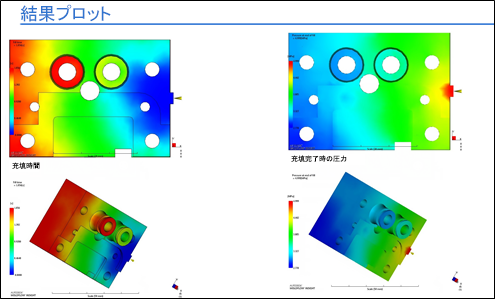
レポートに 4 つの異なる結果プロットを追加するには、FourPlots コマンドを使用します。
FourPlots コマンドの形式は、次のとおりです。
FourPlots, <Plot Name>, <Orientation>, <Plot Name2>, <Orientation2>, <Plot Name3>, <Orientation3>, <Plot Name4>, <Orientation4>。ここで、<Orientation4> は省略可能な引数です。自分で作成した保存されたビューを使用する場合は、方向の引数の前後に引用符を付けます。
Orientation 引数には、次を入力することができます。
- Left
- Right
- Top
- Bottom
- Front
- Back
- Frontleft
- Frontright
- Backleft
- Backright
- Isometric
- <保存されたビュー>
- Current
たとえば、次のようになります。
- FourPlots, "Fill time", TOP, "Pressure", Front, "Weld lines", Front, "Air traps", top
- FOURPLOTS, "Fill time", Front, "Fill time", isometric, "Pressure at end of fill", FRONT, "Pressure at end of fill", Isometric