要素を回転する
ElementTransformUtils クラスは、2 つの静的メソッドを提供して、プロジェクトの 1 つまたは複数の要素を回転させます。
図 20: 回転メソッド
|
メンバー |
説明 |
|
RotateElement(Document, ElementId, Line, double) |
指定した軸の周囲の指定数のラジアンで、ドキュメントの要素を回転させます。 |
|
RotateElements(Document, ICollection<ElementId>, Line, double) |
指定した軸の周囲の指定数のラジアンで、プロジェクト ID によって複数の要素を回転させます。 |
これらのメソッドでは、回転角度はラジアン単位で実行します。次の図のように、正のラジアンとは指定の軸の周囲を時計回りに回転させること、負のラジアンとは指定の軸の周囲を反時計回りに回転させることを意味します。
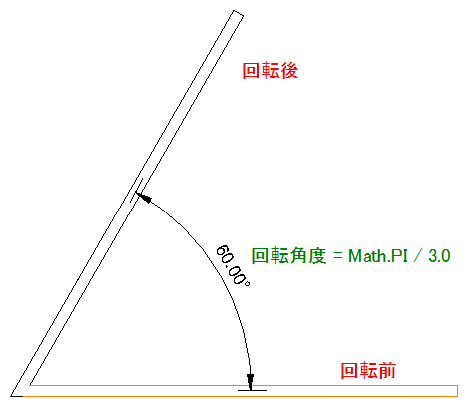
図 31: 反時計回りの回転
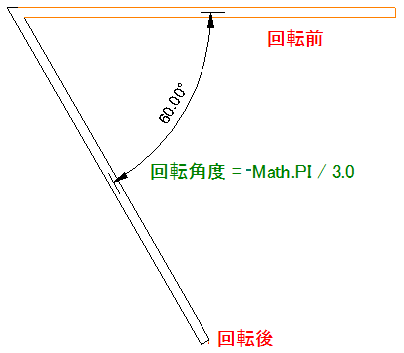
図 32: 時計回りの回転
ピンで固定された要素は回転できません。|
コード領域 10-5: RotateElement()を使用 |
public void RotateColumn(Autodesk.Revit.DB.Document document, Autodesk.Revit.DB.Element element)
{
    XYZ point1 = new XYZ(10, 20, 0);
    XYZ point2 = new XYZ(10, 20, 30);
    // The axis should be a bound line.
    Line axis = Line.CreateBound(point1, point2);
    ElementTransformUtils.RotateElement(document, element.Id, axis, Math.PI / 3.0);
}
|
要素の位置を LocationCurve または LocationPoint 以下に割り当てできる場合は、曲線または点を直接回転させることができます。
|
コード領域 10-6:位置曲線に基づいて回転 |
bool LocationRotate(Autodesk.Revit.ApplicationServices.Application application, Autodesk.Revit.DB.Element element)
{
    bool rotated = false;
    // Rotate the element via its location curve.
    LocationCurve curve = element.Location as LocationCurve;
    if (null != curve)
    {
        Curve line = curve.Curve;
        XYZ aa = line.GetEndPoint(0);
        XYZ cc = new XYZ(aa.X, aa.Y, aa.Z + 10);
        Line axis = Line.CreateBound(aa, cc);
        rotated = curve.Rotate(axis, Math.PI / 2.0);
    }

    return rotated;
}
|
|
コード領域 10-7:位置点に基づいて回転 |
bool LocationRotate(Autodesk.Revit.ApplicationServices.Application application, Autodesk.Revit.Element element)
{
        bool rotated = false;
        LocationPoint location = element.Location as LocationPoint;

        if (null != location)
        {
                XYZ aa = location.Point;
                XYZ cc = new XYZ(aa.X, aa.Y, aa.Z + 10);
                Line axis = Line.CreateBound(aa, cc);
                rotated = location.Rotate(axis, Math.PI / 2.0);
        }

        return rotated;
}
|