The Strategy tab contains these options:
Below centerline — Enable this option to make the tool work on the negative X side of the spindle centerline.
Reuse path in canned cycle — Relates to Use canned cycle. Enable this option to output the curve to the NC file once and then reference it in both the Rough and Finish canned cycles. This option is enabled by default.
Cycle — Select from:
- Turn/Bore — This cycle roughs within the defined material boundaries by feeding parallel to the part's center line along the Z axis while stepping down in the X axis. Select Toward spindle or Toward face. If the Total stock attribute is set, then the part is roughed using curves that are offset from the feature's profile.
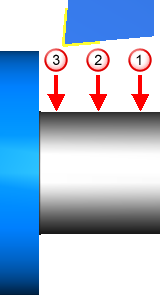
- Face — This cycle roughs within the defined material boundaries by feeding from the outside of the part to the center while stepping into the face of the part along the Z axis in the negative direction.
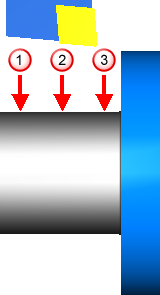
- Back face — This cycle roughs within the defined material boundaries by feeding from the outside of the part to the center while stepping into the face of the part along the Z axis in the positive direction.
Toolpath — Select from:
- Turning — Normal roughing passes are enabled. Each roughing pass is cut in the same direction. For finishing, the tool traces the contour of the feature from right to left and is withdrawn from the part.
- Offset — Roughing toolpaths are created using offsets of the Turn feature's curve. These offsets are clipped against the stock.
- Cut-Grip — Roughing with Iscar cut grip tools is bi-directional. The cut grip finishing style is performed using a unique strategy that is enabled by having a grooving tool that cuts in both directions.
- Round Insert — Round tool roughing toolpaths are designed to ease the tool more gently into a groove shape.
- Turnmilling — Uses a rotating endmill tool with rotating stock. Control the turning spindle speed on the Turn F/S tab. Control the milling spindle speed on the Mill Speed tab.
Rough pass — Enable this option to add a Rough operation to the feature.
Semi-finish pass — Enable this option to add a Semi-finish operation to the feature.
Finish pass — Enable this option to add a Finish operation to the feature. When this option is deselected, the rough pass is still machined as if the finish pass were included. The Finish allowance is left on the roughing pass, and the Bottom finish allowance is left on the roughing pass when Finish bottom is selected, even though the check box is unavailable.
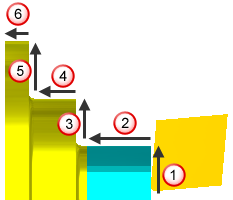
- Conventional — The feed moves in the +X direction, followed by the -Z direction, and so on, until it reaches the end of the stair step.
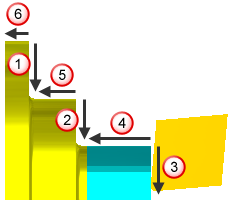
- No drag — Using the
Conventional finish type can reduce the tool life and also result in chips being dragged along the face of the part. Select the
No drag finish, to cut the vertical faces first, in the -X direction, then the horizontal -Z areas.
Feed dir — This is the direction that the tool feeds for the operation. For Turn and Bore features, select Toward spindle or Toward face. For Face and Backface features, select Positive or Negative to specify the direction along the X axis. Set this separately for the Rough, Semi-finish, and Finish operations.