A model is where you do all of your work within ArtCAM. The model includes the vectors, bitmaps, reliefs, and toolpaths to be used to manufacture a product. When you create a model, you need to specify the dimensions of the sheet of material on which you are going to design the product, the resolution in which you want to work, the origin of the model, and the units in which you want to work.
To create a model:
- On the start screen, click
New Model. The
New Model dialog is displayed.
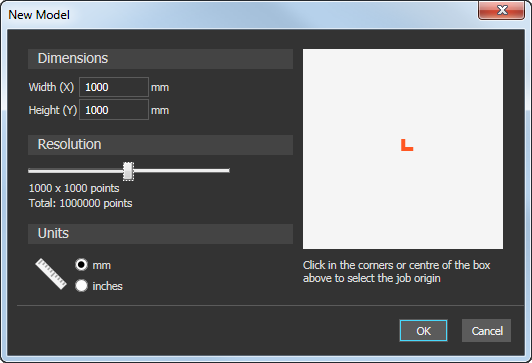
- Select the Units in which you want to work.
- Enter the Width (X) and Height (Y) of the model. The white box shown in the dialog is updated to represent the shape of the sheet of material.
- Click and drag the slider to specify the model's Resolution. The number of pixels is updated.
- Click the centre or a corner of the white box to specify the model's origin. The position of the origin
 icon is updated.
- Click OK to create the model. The dialog closes and ArtCAM switches to display the model screen.