The following is an overview of the changes made to AutoCAD LT 2018.1 for Mac.
New Feature Highlight
New features are highlighted in the product with a badge. Hover over the badge to see a brief description of what's changed. Select OK, I got it to remove the badge and tooltip.

If you prefer not to see the new features highlighted with the badge, clear Highlight New Features on the Help menu.
Plotting
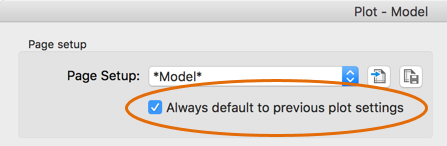
- If you frequently plot using the same settings, select the option to save the current plot settings and automatically use them on your next plot.
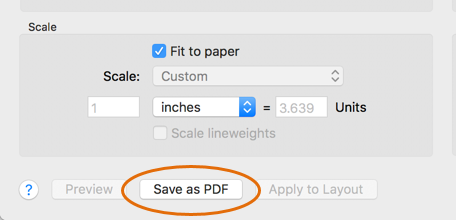
- Select Save as PDF to quickly create a PDF file with the current settings.
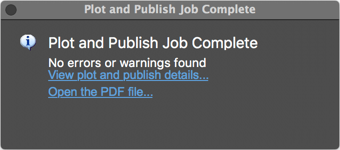
- When plotting to PDF, the Plot confirmation dialog now has an option to open the PDF file.
- The Plot Preview now names the preview file based on the drawing and layout name. This lets you easily identify the preview file if you wish to reference it later.
Page Setup
You can now apply a named page setup to multiple layouts from Quick View.
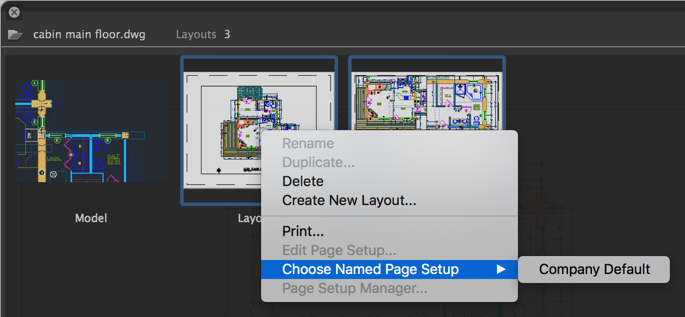
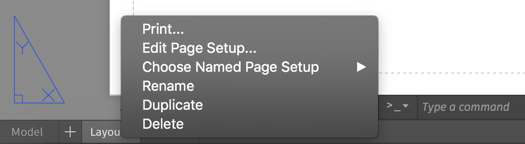
You can also apply a named page setup, edit a page setup, or print from the Layout tab context menu.
Purge
Quickly reduce file size by purging all items in one pass, including nested items and orphaned data. At the command prompt, enter PURGE, then S to change the settings. Follow the prompts to turn the options to purge nested items or orphaned data on or off.
Drag and Drop Support
Drag files from Finder directly into the drawing canvas. Supported file types include:| File Type | Action |
|---|---|
| DWG | Insert or Attach |
| DXF | Insert |
| Image | Attach |
| Attach | |
| LSP | Load Lisp |