We have made several enhancements to the symbols.
Access the Note Template Symbol Library from the Ribbon
You can now access the note template symbol library directly from the ribbon.
Note: Only the templates that belong to the category named Other Templates are available from the ribbon.
System Variable to Control Leader Attach Points for Feature Control Frame Symbols
With AutoCAD Mechanical 2012, we changed the leader attach point for feature control frame symbols to make them comply with drafting standards. This change applied to the ANSI, BSI, CSN, DIN, and JIS feature control frames. However, when opening older drawings, the change in attach point caused the symbol to shift slightly. In some busy drawings the symbol overlapped other objects in the drawing. To overcome this issue, we introduced a new system variable (AMFCFRAMELEADER) to preserve the original leader attach point.
| Value of AMFCFRAMELEADER | Meaning | Example |
| 0 | Attach leaders to the mid point of the feature control frame symbol. (Standard compliant behaviour) |
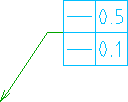
|
| 1 | Attach leaders to the mid point of the top frame of multi-frame feature control frame symbols. (Pre AutoCAD Mechanical 2012 behavior) |
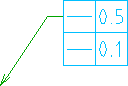
|
Saving to Older Versions
- Leader Note Symbol: The changes are restricted to how you create leader notes and has no impact the way leader notes are saved. Hence no information is lost when you save to an older version of AutoCAD Mechanical.
- AMFCFRAMELEADER System Variable: Changes are restricted to how feature control frame symbols are displayed in the current version of AutoCAD Mechanical. If you save Feature Control Frames to an older version of AutoCAD Mechanical, feature control frames display in the method native to that version of AutoCAD Mechanical.