Manipulate your Factory Design layouts through API in the 2018.1 release or later.
The Factory Design, in-CAD API (Application Programming Interface) is designed to allow programmatic access to, and manipulation of, Factory Design layouts. The API is available in the Inventor Factory and AutoCAD Factory 2018.1 release or later.
Factory Design API allows you to integrate your Factory layouts with other computer systems. For example, if you have a custom tool that is used to analyze ergonomics of a product assembly workflow, and adjust workstation or machine locations accordingly, output of this tool can be used to programmatically affect the location of assets in your Factory Design layout.
To use this API, you must have .NET code running in the CAD process. To run the code in the CAD process, create a plug-in.
To create CAD plug-ins using Microsoft.NET technology:
- Refer to the training provided here:
AutoCAD: Plug-in Training for AutoCAD
Inventor: Plug-in Training for Inventor
-
Once you have a working CAD plug-in, you can reference the Autodesk.Factory.PublicAPI.dll found in:
C:\Program Files\Autodesk\ApplicationPlugins\FactApplication_R22.0.bundle\Contents\x64\ (AutoCAD) and C:\Program Files\Autodesk\Inventor 2018\Bin\InventorFactory\ (Inventor)
- Reference the Autodesk.Factory.PublicAPI.dll to call the Factory Design API.
Important: Do not deploy the DLL with your CAD plug-in.
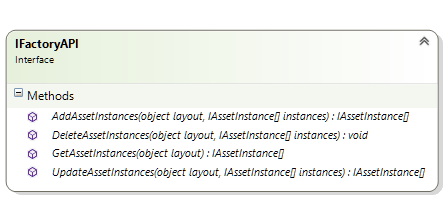
The Factory Design in-CAD API exposes the same interface in both Inventor and AutoCAD, and operates on one layout at a time (no sublayout manipulation). All API methods accept the layout parameter, which represents the layout document being acted on. In Inventor, this is an AssemblyDocument, and in AutoCAD, this is an Autodesk.AutoCAD.DatabaseServices.Database.
The API provides four methods:
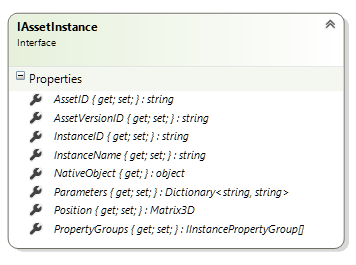
All methods operate on asset instance objects:
To get the AssetID of an asset, refer to the <Family ID> in family.xml.
An asset instance supplies the following Factory Design data.
- Instance ID
- Parameter names
- Parameter values (value returns and updates in centimeters)
- ID of the asset used to construct the instances
- Access to the native CAD object that represents the asset instance in the document: ComponentOccurence in Inventor, and BlockReference in AutoCAD
AddAssetInstances
Use this API to add new asset instances to a layout. Each instance must specify the position where the instance will be placed, and the library asset that will be used to construct the instance. Optionally, the caller can specify parameter values to be used to construct the instance. If parameters are not specified, default values from the library are used.
using APIv2 = Autodesk.Factory.PublicAPI.Objects.v2;
…
var api = Autodesk.Factory.PublicAPI.API.Instance;
APIv2.AssetInstance newInst1 = new APIv2.AssetInstance()
{
AssetID = "41c84844-7b28-4903-bebd-365ca3a6a53c",  //Straight Belt Conveyor
Position = new System.Windows.Media.Media3D.Matrix3D() { OffsetX = 0, OffsetY = 0, OffsetZ = 0 },
};
var insts = api.AddAssetInstances(layout, new PublicAPI.Currency.v2.IAssetInstance[] { newInst1 });
System.Windows.MessageBox.Show(insts.Length.ToString(), "Added instances");
GetAssetInstances
var insts = api.GetAssetInstances(layout);
System.Windows.MessageBox.Show(insts.Length.ToString(), "Get - COUNT");
UpdateAssetInstances
This API is used to change the instance position, parameters, and properties.
var insts = api.GetAssetInstances(layout);
foreach (var item in insts)
{
var position = item.Position;
position.OffsetX += 200;
item.Position = position;
item.Parameters["Length"] = "400";
}
insts = api.UpdateAssetInstances(layout, insts);
System.Windows.MessageBox.Show("update position done");
DeleteAssetInstances
api.DeleteAssetInstances(layout, new PublicAPI.Currency.v2.IAssetInstance[] { instToDelete });