Easily update or download assets in just a few clicks.
To update assets in your AutoCAD layout:
After you create and publish an asset, you might need to make changes. Editing the asset is not a problem, but what about applying those changes to the assets you have already placed in your layout? Update Assets lets you selectively update placed assets to bring them up to date with new data definitions.
- Using the Asset Builder, make the necessary changes to the asset you need to edit and publish the asset.
- Open the layout in which you have placed the asset.
- Select Update Assets in the Factory ribbon to display a list of out-of-date assets.
- Select the checkbox next to the placed assets to update. Clicking anywhere in a row highlights the corresponding assets in the layout to help you easily identify what will change.
- Select Update. The status changes to Successful when asset updates are complete. If an update fails, hover your mouse over the status to see the reason.
To bulk update or download assets from the AutoCAD Asset Browser:
Select to Update Assets to bring your assets up to date with the latest asset data.
You can also Download Assets for use and reuse in your factory layout. Downloaded Factory cloud assets are stored on your local hard drive in a folder called FactoryCloudLibrary.
To update or download factory assets from the Asset Browser:
- Select any folder or list of Search Results from the Asset Browser in AutoCAD.
- Right click the selected folder or Search Results node to access the list of context-menu commands.
- Select Update Assets or Download Assets from the menu.
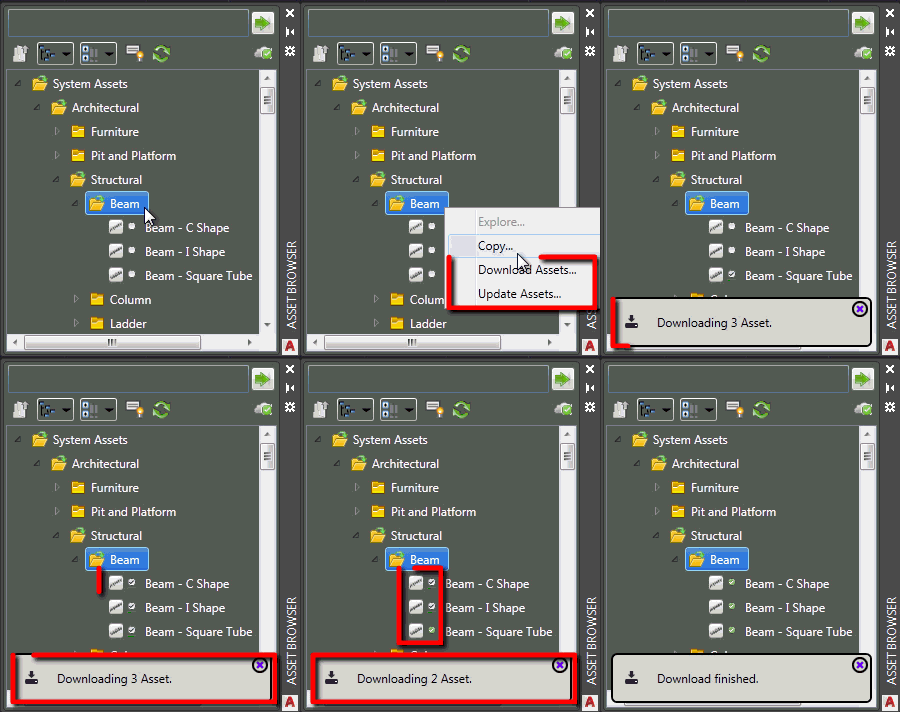
All the assets updated in the selected folder or list of Search Results are up to date with the latest asset data.