With Flame, you can load a subtitle file to quickly add subtitles to a sequence. This is the most effective method as it allows a third party to create subtitles without requiring access to a Flame.
The format of this file is described in Subtitle XML Elements, with a sample provided in Subtitle XML Sample.
Other methods for subtitling include creating Text Timeline FX on the sequence's segments, or adding a new layer to create the subtitles in Gap effects.
Importing Subtitles to a Timeline Sequence
The procedure below adds subtitles from an imported xml file to an opened sequence.
- From the MediaHub tab, import the subtitle file to the Media Library. There are no Specific Import Options to set.
The subtitle XML file is imported as a single-track clip, where the subtitles are editable Text Timeline FX applied to Gap effects.
Note: The subtitle clip is renamed to the name defined by the <name> element in the file. It also takes the timing and resolution defined for the project. - From the Timeline tab, right-click the sequence that requires subtitles and select Open or Open as a Sequence.
- Add a track to the opened sequence.
- Drag and drop the subtitle clip to the new top track.
Each text element appears as a editable Text Timeline FX, at the timecode and length specified in the xml file.
Defining Subtitles Looks Using Text Setup Files
A text setup file can be referenced from the subtitle XML file. The text setup file overrides the font style and position parameters indicated in the current <title> element.
Using a text setup file allows you to apply your preferred text setup to the subtitles in the file, or even have a different text setup for each subtitle.
To create the text setup file:
- In a Text tool, create a text setup.
- Click Save.
- In the Save menu, select Selected Layers from the Save box.
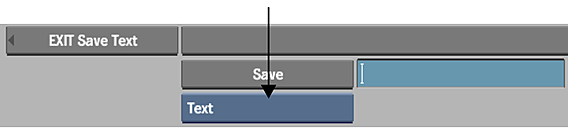
- Choose the directory into which you want to save the file.
- Type a name for the file and press Enter or click the Save button.
The file is saved and you return to the Text tool.
To associate the text setup file to each subtitle element:
- Open the subtitle XML file in a text editor. Tip: Consider using a text editor with syntax coloring for XML elements. It makes for easier navigation of files.
- Within each <title> element, indicate the path to the text setup file in the <setup> element.
The parameters in the text setup file override the following text parameters within the <title> element of the subtitle: font, size, font colour, vertical, and horizontal.
Once you import the subtitle file in Flame, you can see the impact of the text setups on the imported subtitles. Changes to the text setup do not propagate to an imported subtitle file: if you modify the saved text setup after importing a subtitle file, you need to re-import that same file to update the subtitles referencing that setup.
Search for subtitles that are not properly linked to a setup file:
- Place the positioner on the subtitle track.
- Click the magnifying glass icon at the bottom right side of the timeline.
The Find and Select in Timeline window appears.
- Enable
- Gaps
- Every Criteria Below
- Comments. Also enter in the Comments field *Unable* (make sure to enter the asterisk wildcards).
- Click Select on Current Track.
The Find and Select in Timeline windows closes, and subtitles not properly linked to a text setup are highlighted. You need to fix the subtitles file to use the correct text setup path, and then import the file again.