You can wipe the result image when you want to apply a uniform colour at the current frame in a single brush stroke. Alternatively, you can use a source, to wipe over an image.
To wipe the result image with a colour or a source:
- From the View box, select Result (F4).
- Do one of the following:
- Pick the wipe colour by clicking the colour pot to the right of the Wipe button.
- Select the source in the Sources list and enable Use Source.
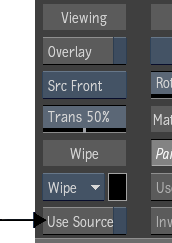
- To display the source as an overlay of the result image, enable Overlay (Tab). You can apply transformations to the source before you apply the wipe:
- To interactively offset a source image, press Ctrl+Shift and drag the source. See Previewing a Reveal or Clone Using a Reference Image.
- To scale the source, enter a value in the Scale field.
- To rotate the source, enter the angle of rotation in the Rotate field.
- Do one of the following:
- Click Wipe to wipe the front and matte.
- Click the Wipe dropdown list and select Wipe F to wipe the front only.
- Click Wipe dropdown list and select Wipe M to wipe the matte only.