This message is displayed when a material condition modifier has not been specified for a datum feature of size.
To resolve this issue do the following:
- Click the message in the Tolerance Advisor browser to cross highlight the feature in the model browser.
- Right-click the model browser entry and select Edit DRF.
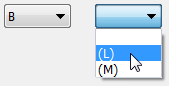
- Specify a material condition modifier for the datum feature of size in the Datum Reference Frame dialog box.
- Click OK.