There are many more shelves than the ones displayed by default in the user interface. If you want to use a shelf that does not appear in the UI, click the Shelf icon
 , and select
Load Shelf.
, and select
Load Shelf.
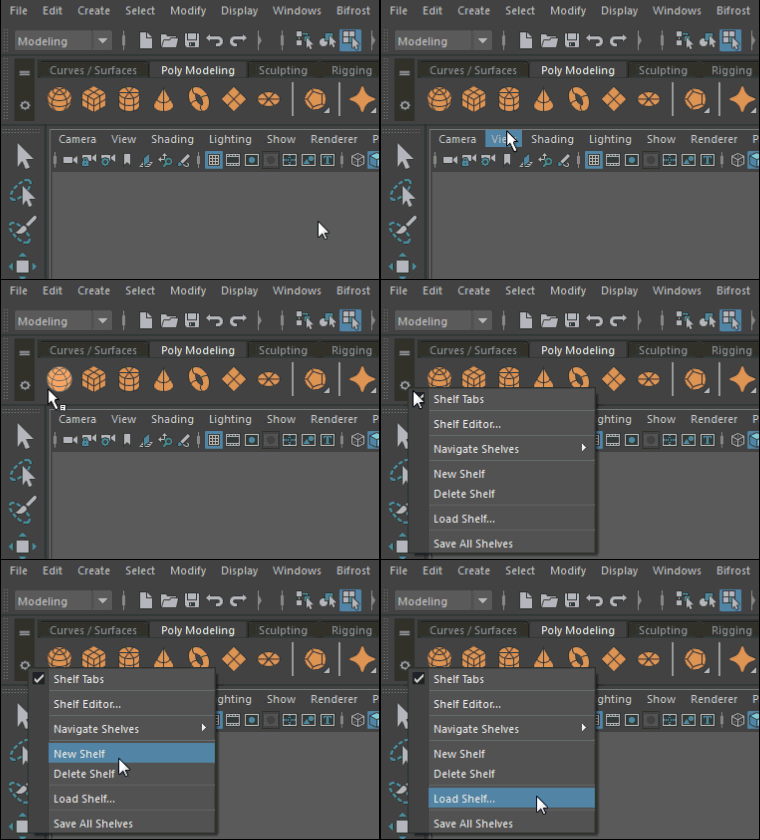 The
Load Shelf window opens, showing the contents of the
runtime/script/shelf directory.
The
Load Shelf window opens, showing the contents of the
runtime/script/shelf directory.
, and select
Load Shelf.
To add default shelves to Maya on Linux
- Open the Script Editor (Window > General Editors > Script Editor).
- To load all shelves, copy the following script and paste it into the Script Editor window, then select Command > Execute. Select only some shelves from the list below if you do not want to load them all.
loadNewShelf "shelf_General.mel";
loadNewShelf "shelf_Curves.mel";
loadNewShelf "shelf_Surfaces.mel";
loadNewShelf "shelf_Polygons.mel";
loadNewShelf "shelf_Deformation.mel";
loadNewShelf "shelf_Animation.mel";
loadNewShelf "shelf_Dynamics.mel";
loadNewShelf "shelf_Rendering.mel";
loadNewShelf "shelf_Fluids.mel";
loadNewShelf "shelf_Fur.mel";
loadNewShelf "shelf_Hair.mel";
saveAllShelves $gShelfTopLevel;