For descriptions of material node attributes, see Surface materials.
To animate an attribute
- In Maya’s main window, set the Time Slider to a frame.
- In the node’s
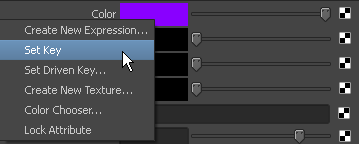
Attribute Editor, right-click the label of the attribute you want to key, such as the
Color attribute, and select
Set Key from the pop-up menu to create a key.
- Set the Time Slider to another frame.
- Adjust the attribute and set another key.
- Playback the animation. The surface to which the rendering attributes are assigned animate in the view.