For users who want to simulate the filling of slightly different models under the same conditions, you can now copy study settings across from one study to another. This feature also saves you time if you plan to change only one or two study settings between different studies.
- Material
- Mesh type
- Mesh settings
- Molding process
- Analysis sequence
- Process settings
For each of these, if you select it, all the settings are copied. It is not possible to be selective about which process settings or mesh settings you want to copy and which ones you don't.
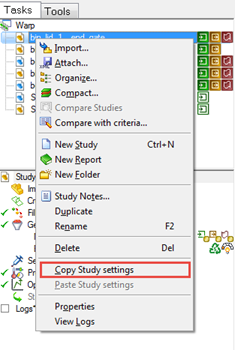
The Copy Study settings command is located in the context menu when you click the right-hand mouse button on a study in the Project View pane.
When you paste the study settings into the target study, a dialog opens enabling you to select the settings you want to copy. In some cases, such as process settings, examples of process settings are listed, although they can't be deselected. However, if you select Process Settings, ALL process settings are copied, regardless of whether or not they are listed.