
Analysis tab
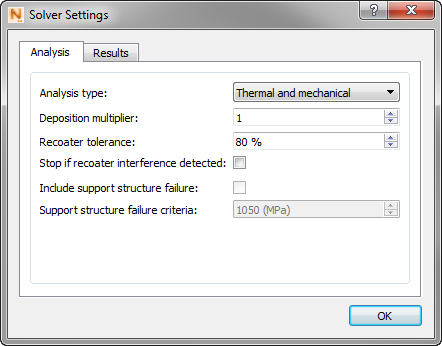
Analysis Type can be either Thermal only or both Thermal and Mechanical.
Use the Deposition Multiplier to increase the timing so as to add the time required to build multiple identical parts on the build plate. For example, if there are 12 identical parts on the build plate, and you want to simulate only 1 of the parts, enter a value of 12 for a machine with a single laser. Non-integer values are allowed for the simulation of multiple non-identical parts. If multiple lasers have been enabled in the Machine settings the system automatically adjusts the Deposition Multiplier setting to adjust the deposition time for multiple parts and multiple lasers.
Recoater Tolerance is used to set the minimum required clearance between the previous build and the recoater blade, expressed as a percentage of the powder layer below which a Recoater Clearance warning will be issued. For more information, see About Recoater Tolerance.
Stop if Recoater Interference Detected ends the simulation if the built part deflects upward far enough to exceed the specified Recoater Tolerance.
If Include Structure Failure Criteria is selected, the simulation will include warnings when the stress experienced by a support structure element exceeds the Support Structure Failure Criteria. This activates the next field, Support Structure Failure Criteria where the failure stress value should be entered in MPa.
Results tab
Turn structural plasticity on or off, choose data options, and select the desired stress result types.
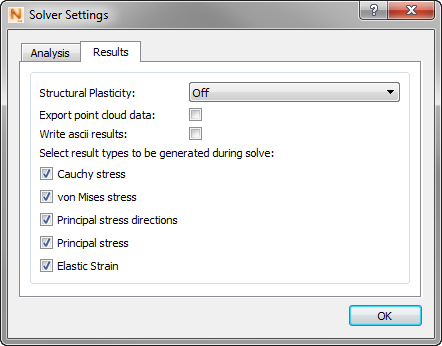
Structural Plasticity does not apply to Thermal analysis, but if you selected Mechanical or Thermal and Mechanical on the Analysis tab, two options are available:
- Off provides qualitative stress results throughout the processing and post processing simulation. The material is not permitted to yield when loaded, which results in very high and nonphysical stress buildups. When the part is cut from the build plate in the analysis, there will be an excessive prediction of deformation due to the release of the large stresses.
- On provides quantitative stress results after part cool down. This setting produces smaller displacement results, and more accurate stress results. It adds a plasticity step to the end of the analysis, after the part has cooled down to the final temperature and before it is removed from the build plate.
| Structural Plasticity On | Structural Plasticity Off |
|---|---|
| Accurate Distortion during deposition model | Accurate Distortion during deposition model |
| Accurate Distortion Post Bolt Release and Post EDM | Simulates in less time than with Structural Plasticity On |
| Accurate Stresses post deposition | Qualitative Stress results available during deposition modeling |
Used for:
|
Used for:
|
For each selection, you can use check boxes to turn off any unwanted result types.
Select Write ascii results if you want the content of result files <project>.geo, <project>.geoc, and <project>.ens to be in ASCII rather than binary format. ASCII results can be useful in custom optimization routines.
Select Export point cloud data if you want the system to export a series of 3D data files of the surface nodal simulation results, for post processing. Depending on your structural plasticity setting, you will get some or all of the following files:
| File extension | Result type |
| .wrtu | Nodal displacement results |
| .wrtu.epp | Nodal plastic strain results |
| .wrtu.ept | Nodal elastic strain results |
| .wrtu.eqp | Nodal equivalent plastic strain results |
| .wrtu.sd3 | Nodal principal stress results |
| .wrtu.sig | Nodal Cauchy stress results |
| .wrtu.sp3 | Nodal principal stress direction results |
| .wrtu.svm | Nodal Von mises stress results |
| .wrtu.tmp | Nodal temperature results |
Depending on the existence of support structures and the Mechanical constraints chosen on the Build Plate menu, up to 3 .wrtu files will be exported at various points of the simulation:
| wrtu_1 | wrtu_2 | wrtu_3 | |
|---|---|---|---|
| No support structures
Fix bottom of the build plate |
After process simulation has completed and part has cooled to final temperature | After part has been removed from the build plate | X |
| No support structures
Simulate bolt release |
After process simulation has completed, part has cooled to final temperature, and bolt release has been simulated | After part has been removed from the build plate | X |
| Support structures
Fix bottom of the build plate |
After process simulation has completed and part has cooled to final temperature | After part and support structure have been removed from the build plate | After support structures have been removed |
| After process simulation has completed, part has cooled to final temperature, and bolt release has been simulated | After part and support structure have been removed from the build plate | After support structures have been removed |