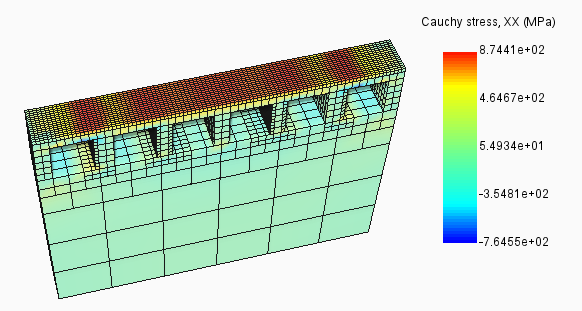
After manufacture, heat treat parts to relieve stress.
Video length (2:47).
In Simulation Utility, users can add a heat treatment cycle to the end of a thermo-mechanical simulation to relieve stresses accumulated during manufacturing. This tutorial uses the material Inconel 625.
Sample files for use with the tutorials are available on the Download Page.
- In Simulation Utility, click , browse to the sample folder Example_17, and open the model Example_17.tivus.
- On the Home tab, click
Machine and check that
Processing Parameters is set to Inconel 625.

- On the Home tab, click Heat Treatment.
- In the dialog, select Simulate Heat Treatment, and set the Material Annealing Temperature to 649 (C).
- In the
Heat Treatment Process table, set the values shown:
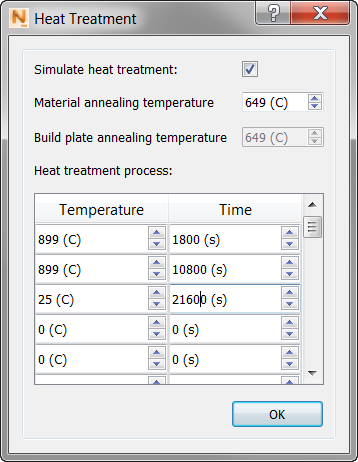
- Click OK to close the Heat Treatment dialog, then click Solve.
- Load the results when available, and review the Temperature results.
The Timeline along the bottom of the simulation window is very useful for following the stages of this simulation. A sample result:
- Printing, increments 1 – 8
- Cooldown, increment 9
- Plasticity, increment 10
- Heat treatment, increments 11 – 16
- Substrate removal, increment 17
You see temperatures increase through the deposition process, then cool down to room temperature. Temperatures increase again through the heat treatment phase, then cool slowly until build plate removal at the end. You may want to note the time in seconds when transitions occur so that you can compare these temperature events with the stress results at the same time. Remember that heat treatment occurs during the final 21600 seconds of the simulation.
- Now view the Cauchy stress results. On the Results tab, click
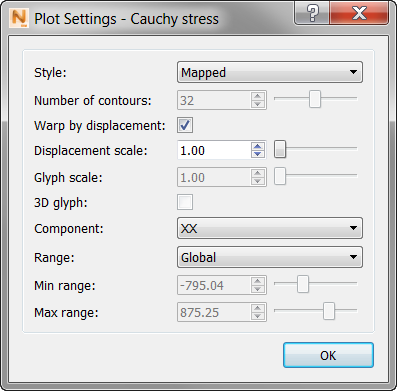
Plot Settings. Check that the
Component value is XX to focus on the longitudinal stress, and change the
Range setting to
Global.
The Timeline and time stamp for these results indicates that we are seeing the stress results of the heat treatment process. Stress is at the maximum during increment 1 of heat treatment (shown below), then gradually relaxes.