 Utilize
Local Simulation results to calculate density maps
Utilize
Local Simulation results to calculate density maps
To calculate density map information, load the mechanical results from Autodesk® Netfabb® Local Simulation and select or define formulas to convert them into the actual density map values.
To Load and Display Simulation Data
To begin using simulation data to generate density map information, prepare the original part, have it loaded in the default platform, and launch the
 support module on it.
Now you can add simulation information:
- From the main menu, choose .
- Browse to the folder created by Autodesk® Simulation Utility for Netfabb® during simulation setup.
- Select the file ending in _mechanical.simresult and click OK.
- Assign the imported data to the loaded part:
- In the project tree, select the Netfabb Simulation results entry to assign.
- In the context area, click Assign simulation to part.
- In the appearing window, select the appropriate part and click
Select.
This will spawn a new part on the platform, with the name ending in (simulation).
- Again, in the project tree, select the Netfabb Simulation results.
- In the context area, click Display for support editing.
- In the project tree, select the Generate Support branch of the part with the supports to be modified.
- In the context area, switch to the View tab.
In the Process simulation section, you can now make your selection to display simulation results superimposed onto the actual part.
To Generate Density Map Information
Provided you have loaded the simulation data as previously explained, you can now begin to derive the adjustments to the density map. In its default state, the map commands neither thickening nor thinning.
To begin, click Generate Density map in the Process simulation section of the support module's View tab. This will present you with a dialog where you may load and save, select, modify, delete or create rulesets to convert stress data.
There are two methods for creating the ruleset; using a curve between points defined manually in a graph display, and a formula editor. Select the method you wish to choose, Linear steps, or Formular.
Using Linear steps,
- Left-click and hold curve nodes to drag them around the graph display.
- Left-click in areas of the graph display without nodes close by to add a new node.
- Right-click a node to remove it.
When using the Formular section instead,
- Define the formula in the text field.
Tip: Use the button vonmises to quickly insert the text vonmises into your formula.
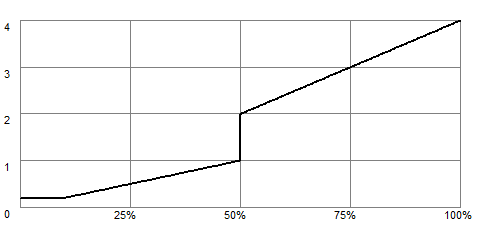
An example generated with the formula 2 * if(vonmises < 0.5, vonmises, 2 * vonmises)