 Generate a parametric part from a mesh using the boundary representation model
Note: We recommend to use this function only on sane meshes without self-intersections, holes, overlapping or inverted triangles, and other issues.
- Select the part.
- From the main menu, choose
Modify >
 Mesh To BREP.
- Make adjustments as needed.
- Click Calculate.
- Click Apply to accept the result, or click Reset to return to making more adjustments.
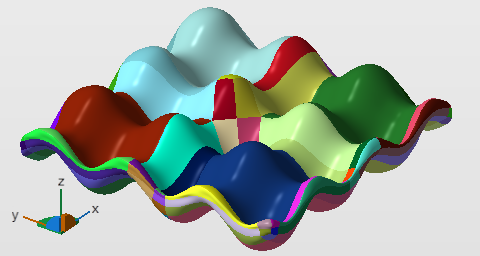
BREP patches are highlighted during the conversion
Settings Reference
Preprocessing
- Target Edge Length: The remesher will try to adhere to this edge length but may deviate if the geometry requires it.
- Resolution: Lower values significantly increase generation of triangles and lead to increased calculation times.
- Detect and preserve sharp edges and Critical angle: This is the threshold of the angle between normals of the triangles forming the edge. Edges of this or greater angles will be smoothed. This ignores the signs of the normals, so both types of edges, concave or convex, may be affected by this.
Surface generation
- Approximation: Sets a distance threshold for permitted deviation from the original surface
- Number of surfaces: Allows to set a target for the amount of BREP patches to be used for surface approximation.
Display settings
- Tessellation settings: Provides selection from the Retessellation Library.
- Show triangle mesh: Switches triangle borders to be highlighted by a black line.