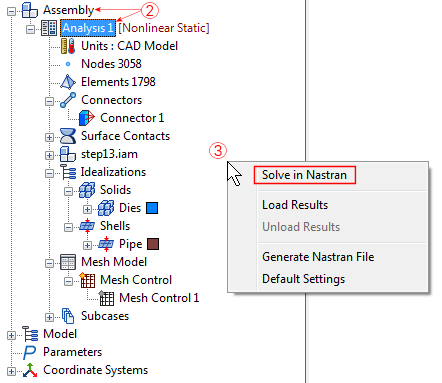
When using the Solve in Nastran option, Autodesk Nastran In-CAD solves the model using the Autodesk Nastran Solver.
The progress of the analysis can be seen in the Autodesk Nastran status window within Autodesk Nastran In-CAD. In Autodesk Inventor, the solution progress displays in the browser (model tree) area. In SOLIDWORKS, the progress displays in the model canvas area.
There are three ways to execute the Solve in Nastran command:
- Click the
Run command in the
Solve panel of the ribbon bar.

- Right-click the Part/Assembly or analysis name heading ("Analysis 1" in the example below) and choose Solve in Nastran from the context menu.
- Right-click on an empty space of the Autodesk Nastran Model Tree and select
Solve in Nastran from the context menu.