Creating and Editing Stairs
StairsEditScope
As with other types of elements in the Revit document, a Transaction is necessary to edit stairs and stairs components. However, to create new components such as runs and landings, or to create new stairs themselves, it is necessary to use an Autodesk.Revit.DB.StairsEditScope object which maintains a stairs-editing session.
StairsEditScope acts like a TransactionGroup. After a StairsEditScope is started, you can start transactions and edit the stairs. Individual transactions created inside StairsEditScope will not appear in the undo menu. All transactions committed during the edit mode will be merged into a single one which will bear the name passed into the StairsEditScope constructor.
StairsEditScope has two Start methods. One takes the ElementId for an existing Stairs object for which it starts a stairs-editing session. The second Start method takes the ElementIds for base and top levels and creates a new empty stairs element with a default stairs type in the specified levels and then starts a stairs edit mode for the new stairs.
After runs and landings have been added to the Stairs and editing is complete, call StairsEditScope.Commit() to end the stairs-editing session.
Adding Runs
The StairsRun class has three static methods for creating new runs for a Stairs object:
- CreateSketchedRun - Creates a sketched run by providing a group of boundary curves and riser curves.
- CreateStraightRun - Creates a straight run.
- CreateSpiralRun - Creates a spiral run by providing the center, start angle and included angle.
Adding Landings
Either automatic or sketched landings can be added between two runs. The static method StairsLanding.CanCreateAutomaticLanding() will check whether two stairs runs meet restriction to create automatic landing(s). The static StairsLanding.CreateAutomaticLanding() method will return the Ids of all landings created between the two stairs runs.
The static StairsLanding.CreateSketchedLanding method creates a customized landing between two runs by providing the closed boundary curves of the landing. One of the inputs to the CreateSketchedLanding method is a double value for the base elevation. The elevation has following restriction:
- The base elevation is relative to the base elevation of the stairs.
- The base elevation will be rounded automatically to a multiple of the riser height.
- The base elevation should be equal to or greater than half of the riser height.
Example
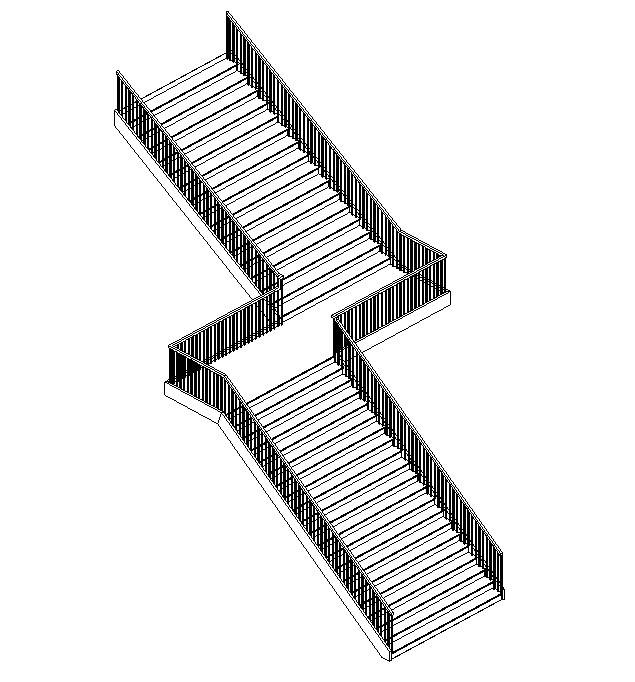
The following example creates a new Stairs object, two runs (one sketched, one straight) and a landing between them.
|
Code Region: Creating Stairs, Runs and a Landing |
// FailurePreprocessor class required for StairsEditScope
class StairsFailurePreprocessor : IFailuresPreprocessor
{
    public FailureProcessingResult PreprocessFailures(FailuresAccessor failuresAccessor)
    {
        // Use default failure processing
        return FailureProcessingResult.Continue;
    }
}

private ElementId CreateStairs(Document document, Level levelBottom, Level levelTop)
{
    ElementId newStairsId = null;

    using (StairsEditScope newStairsScope = new StairsEditScope(document, "New Stairs"))
    {
        newStairsId = newStairsScope.Start(levelBottom.Id, levelTop.Id);

        using (Transaction stairsTrans = new Transaction(document, "Add Runs and Landings to Stairs"))
        {
            stairsTrans.Start();

            // Create a sketched run for the stairs
            IList<Curve> bdryCurves = new List<Curve>();
            IList<Curve> riserCurves = new List<Curve>();
            IList<Curve> pathCurves = new List<Curve>();
            XYZ pnt1 = new XYZ(0, 0, 0);
            XYZ pnt2 = new XYZ(15, 0, 0);
            XYZ pnt3 = new XYZ(0, 10, 0);
            XYZ pnt4 = new XYZ(15, 10, 0);

            // boundaries
            bdryCurves.Add(Line.CreateBound(pnt1, pnt2));
            bdryCurves.Add(Line.CreateBound(pnt3, pnt4));

            // riser curves
            const int riserNum = 20;
            for (int ii = 0; ii <= riserNum; ii++)
            {
                XYZ end0 = (pnt1 + pnt2) * ii / (double)riserNum;
                XYZ end1 = (pnt3 + pnt4) * ii / (double)riserNum;
                XYZ end2 = new XYZ(end1.X, 10, 0);
                riserCurves.Add(Line.CreateBound(end0, end2));
            }

            //stairs path curves
            XYZ pathEnd0 = (pnt1 + pnt3) / 2.0;
            XYZ pathEnd1 = (pnt2 + pnt4) / 2.0;
            pathCurves.Add(Line.CreateBound(pathEnd0, pathEnd1));

            StairsRun newRun1 = StairsRun.CreateSketchedRun(document, newStairsId, levelBottom.Elevation, bdryCurves, riserCurves, pathCurves);

            // Add a straight run
            Line locationLine = Line.CreateBound(new XYZ(20, -5, newRun1.TopElevation), new XYZ(35, -5, newRun1.TopElevation));
            StairsRun newRun2 = StairsRun.CreateStraightRun(document, newStairsId, locationLine, StairsRunJustification.Center);
            newRun2.ActualRunWidth = 10;

            // Add a landing between the runs
            CurveLoop landingLoop = new CurveLoop();
            XYZ p1 = new XYZ(15, 10, 0);
            XYZ p2 = new XYZ(20, 10, 0);
            XYZ p3 = new XYZ(20, -10, 0);
            XYZ p4 = new XYZ(15, -10, 0);
            Line curve_1 = Line.CreateBound(p1, p2);
            Line curve_2 = Line.CreateBound(p2, p3);
            Line curve_3 = Line.CreateBound(p3, p4);
            Line curve_4 = Line.CreateBound(p4, p1);

            landingLoop.Append(curve_1);
            landingLoop.Append(curve_2);
            landingLoop.Append(curve_3);
            landingLoop.Append(curve_4);
            StairsLanding newLanding = StairsLanding.CreateSketchedLanding(document, newStairsId, landingLoop, newRun1.TopElevation);

            stairsTrans.Commit();
        }
        // A failure preprocessor is to handle possible failures during the edit mode commitment process.
        newStairsScope.Commit(new StairsFailurePreprocessor());
    }

    return newStairsId;
}
|
The stairs resulting from the above example:
Multistory Stairs
The MultistoryStairs class allows stairs to span multiple levels. A multistory stairs element may contain multiple stairs whose extents are governed by base and top levels.
This element will contain one or more Stairs elements. Stairs elements are either:
- a reference instance which is copied to each level covered by groups of identical stairs instances which share the same level height,
- or individual Stairs instances which are not connected to a group with the same level height.
Stairs in a connected group can be edited together by modifying the associated Stairs instance. For specific floors that need special designs, stairs can be separated from the group with the Unpin method - changes made to the unpinned Stairs will not affect other any other instance in the element. The stairs can later be added back into the group with the Pin method, however any changes made to the stair will be lost since the stair's properties will be overridden by the group specifications.
|
Code Region: Create Multistory Stairs |
// create new MultistoryStairs MultistoryStairs multistoryStairs = MultistoryStairs.Create(stairs); // get all levels that can be connected to this multistoryStairs IEnumerable<ElementId> levelIds = new FilteredElementCollector(doc).OfClass(typeof(Level)).Cast<Level>().Where(q => multistoryStairs.CanConnectLevel(q.Id)) .Select(q => q.Id); // Connect the levels to the multistoryStairs // The input to ConnectLevels is a HashSet or SortedSet, so a HashSet is created from the IEnumerable returned by FilteredElementCollector multistoryStairs.ConnectLevels(new HashSet<ElementId>(levelIds)); |
When new stairs are created using the StairsEditScope.Start(ElementId, ElementId) method, they have default railings associated with them. However, the Railing.Create() method can be used to create new railings with the specified railing type on all sides of a stairs element for stairs without railings. Unlike run and landing creation which require the use of StairsEditScope, railing creation cannot be performed inside an open stairs editing session.
Since railings cannot be created for Stairs that already have railings associated with them, the following example deletes the existing railings associated with a Stairs object before creating new railings.
|
Code Region: Create Railings |
private void CreateRailing(Document document, Stairs stairs)
{
    using (Transaction trans = new Transaction(document, "Create Railings"))
    {
        trans.Start();

        // Delete existing railings
        ICollection<ElementId> railingIds = stairs.GetAssociatedRailings();
        foreach (ElementId railingId in railingIds)
        {
            document.Delete(railingId);
        }
        // Find RailingType
        FilteredElementCollector collector = new FilteredElementCollector(document);
        ICollection<ElementId> RailingTypeIds = collector.OfClass(typeof(RailingType)).ToElementIds();
        Railing.Create(document, stairs.Id, RailingTypeIds.First(), RailingPlacementPosition.Treads);
        trans.Commit();
    }
}
|