Displays a list of all open drawings and the layouts in the selected drawing.
QUICKVIEW (Command)
File Tab:

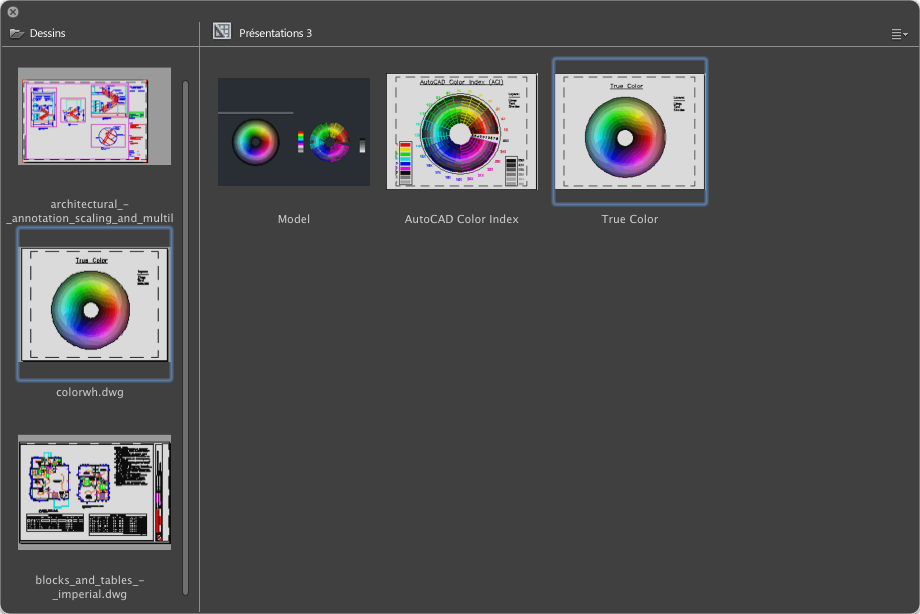
List of Options
The following options are displayed.
Drawings
Displays a list of all open drawings.
Double-clicking a thumbnail sets that drawing current. You can also right-click a thumbnail to display a shortcut menu of additional file management options. The following items are on the Drawing shortcut menu:
- Save. - Saves the drawing using its current name and location.
- Close <drawing>. - Closes the drawing. You are prompted to save changes if the drawing has been changed since it was last saved.
- Close All. - Closes all open drawings. You are prompted to save any drawings that have been changed before they are closed.
- Duplicate. - Allows you to create a copy of the drawing. The Save Drawing As dialog box is displayed.
- Create New Layout. - Adds a new layout to the drawing. Enter a name for the new layout.
Layouts List
Displays a list of all layouts in the selected drawing.
Double-clicking a thumbnail switches to that layout. You can also right-click a thumbnail to display a shortcut menu of additional layout management options. The following items are on the Layout shortcut menu:
- Rename. - Allows you to change the name of the layout. The Model layout cannot be renamed.
- Duplicate. - Creates a copy of the selected layout. Enter a name for the new layout.
- Delete. - Removes the layout from the drawing.
- Create New Layout. - Adds a new layout to the drawing. Enter a name for the new layout.
- Print. - Allows you to output the layout to hardcopy or PDF. The Plot dialog box is displayed when a single layout is selected or the Batch Publish dialog box is displayed when more than one layout is selected.
- Edit Page Setup. - Allows you to modify the current page setup settings for the layout. The Page Setup dialog box is displayed.
- Choose Named Page Setup. Shows a list of named page setups for the selected drawing. Click a named page setup to apply it to the selected layouts.
Note: Use the Shift or Command key to select multiple layouts.
- Page Setup Manager. - Allows you to manage the output settings for the layout. The Page Setup Manager is displayed.