To access the Results window, click the tab labeled Results to the top right of the Graphics window.
The Results window is to the right of the Graphics window and contains the following tabs:
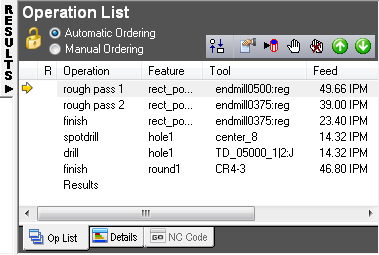
Op List — This tab displays a list of all of the operations in the part, with information about each operation such as the tool used, and feed and speed values.
Details — This tab contains two reports, select one of the options at the top of the tab:
- Operation List details
- Tool List details
NC Code — This tab is displayed only after you have simulated your part.
Tool Posts — This tab lists the operations assigned to each turret of the machine. It is displayed only when using synchronized turning.
Tip: To toggle the display of the
Results window, click on the tab name to collapse or expand it.
Tip: To adjust the width of the Results window, move the cursor over the
Results window border until the cursor changes to
 , then click and drag the border.
, then click and drag the border.