If you are creating a From Curve feature, the second page of the wizard is the New Feature - Curves page. This page is where you specify the curve that dictates the shape of your feature. This page is the same for all From Curve feature types.
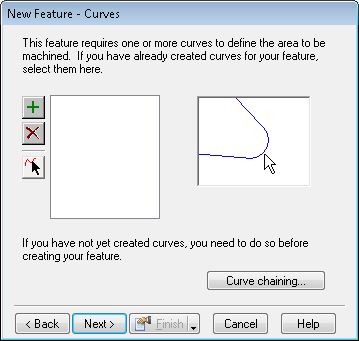
To complete this page:
- If you still need to chain your geometry into a curve, click the Curve chaining button and chain the curve.
- Select the curves(s) in the graphics window. Any curves that were selected before opening the wizard are already listed.
- Click
Add
 to add selected curves to the list. In the graphics window, the added curves change to the highlight color (green by default).
- To remove a curve from the list, select the curve in the graphics window or in the list and click
Delete
 . To select a range of names from the list, select the top name and then hold down the SHIFT key and select the bottom name.
- To select the curves one at a time, click
Pick curve
 , then select the geometry or curve in the graphics window. Repeat this procedure to select each curve.
- When you have selected the curves required to define the feature, click Next to open the New Feature - Location page.