Using the Family of Parts Programming feature speeds up the process of CNC programming for similar parts created from tabulated drawings.
It allows you to program one part in a family and then automatically substitute any variable parameters by manipulating a separate Parameters file (*.prm) containing parameter definitions.
To use Family of Parts Programming:
- Using a text editor, create a separate Parameter file for part in the family.
Each file should contain 26 lines (one for each letter in alphabet: A to Z) and must be saved using the file extension .prm. To define a value for a letter in the file, use an equals (=) sign followed by a number. For example,
A=1.3
B=5.6
C
………..
Z
In this example, values have been defined for Parameters A and B. Parameters C to Z are not relevant to this part, so values have not been defined.
- Select the Parametric Input check box in the Preferences dialog.
- Draw or import part geometry for a 'master' part using dimensions that correspond to one of the parameter files you created.
- Using PartMaker's CAD mode, double-click every geometry element ( Line, Arc, Circle) that might change depending on parameters in the Parameters files. PartMaker displays the Parametric Line Info, Parametric Arc Info or Parametric Circle Info dialogs for you to enter parametric definitions. For example:
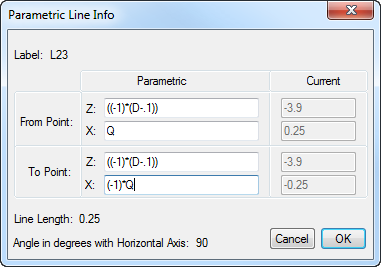
In PartMaker all Z dimensions are programmed as negative values. When performing mathematical operations on parameters, use parentheses, as show above. PartMaker uses the standard order of operations for multiplication, division, addition, subtraction and the application of trigonometric functions.
- Select Edit > Family of Parts Programming > Set Parametric Boundaries to display the Set Parametric Boundaries dialog and enter a parametric definition of part boundaries.
- Using PartMaker's CAM mode, program all groups of part features and assign them to the part geometry. While programming part features, you may see the Parametric Icon
 displayed next to some variables on the Profile Group Parameters or Hole Group Parameters dialog. Click the icon to display the Parametric Definition dialog and enter parametric definitions for these variables.
When assigning part features to the geometry, snap the features to the part geometry rather than using the ZX Snap Mode. Only toolpaths associated with geometry are rescaled when you apply parametric dimensions from a Parameter file to the part.
- Save the PartMaker job file.
- To re-define the part according to another Parameter file:
- Select Edit > Family of Parts Programming > Open Parameter File and select a parameter file.
- Select Edit > Family of Parts Programming > Apply Parametric Dimensions. PartMaker prompts you to confirm that you want to apply the selected parametric dimensions from the file. When you confirm, PartMaker updates the part geometry and profile curves to reflect the dimensions in the parameter file.