Render Items (MRenderItem)
The formal interface presented for a render item is the class MRenderItem.
Figure 15
MRenderItem has various properties. Depending on whether a render item is involved in the update phase or the rendering phase, the interfaces to these properties may or may not be writeable.
The main properties are as follows:
An associated Maya DAG path and a possible Maya DAG component. These provide context for the render item with respect to Maya as opposed to any type of evaluation access.
Custom data. This is data that the plug-in writer may optionally attach and have passed through the pipeline. This is readable and writable.
The bounding box of the item.
Whether the item is “enabled.” Anything that is enabled is tagged to be drawn in the rendering phase.
A draw mode. The draw mode that this render item should draw in.
A reference to an instance of a shader.
A reference to geometric information, which includes:
- A reference to geometry and a description of its format
- A reference to geometric indexing and the primitive type.
Depth priority
Depth priority sets how far towards the active camera a render item is moved when drawing. This helps to avoid depth-fighting which can occur with render items whose drawing overlaps each other in depth. For example, a render item drawing wireframe and one drawing filled could be drawn at the same depth. To avoid the wireframe item from being obscured by the shaded item, the depth priority on the wireframe item can be “raised” to avoid being obscured.
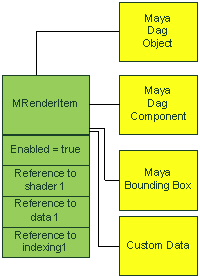
Figure 16
With these proprieties this class can represent any or all of the following Maya options:
- An item to render some dependent “sub-object” (for example, vertex components)
- An item to render a sub-region (for example, a face set on a mesh)
- An item to render per-instance
- An item to render per DAG object ghost (ghosting)
- An item which renders to depict a given draw mode (for example, an item for “wireframe” versus an item for “shaded”)
As a single render item does not represent all possibilities a collection of render items (MRenderItemList) is maintained per renderable object. However, depending on what needs to be rendered, it is possible that zero or more of these items are “enabled” (passed down the pipeline) for drawing.
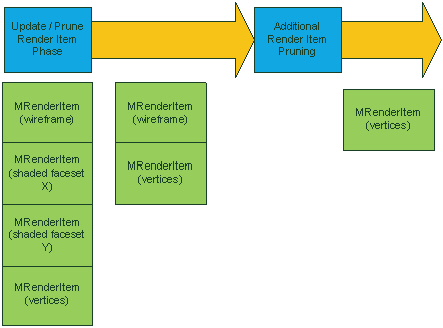
Figure 17
As an example a renderable object may have 4 items: 2 for shaded sub-regions, 1 for wireframe and 1 for vertex display. Pruning may occur at update time leaving only the wireframe and vertex display items. Further pruning may remove the “wireframe” render item leaving only the vertex display item. Pruning generally reflects internal requirements such as viewport display modes.
MRenderItem objects are assumed to be transient, and as such plug-ins should not hold on to references to instances of this class. Instances of MRenderItem cannot be created or deleted directly. Plug-ins must use static Create() and Destroy() methods on MRenderItem. This provides for stability when memory is allocated/deallocated from different DLLs.