创建加工等轴测图形。指定 Iso 类型、覆盖选项和 DWF 输出。
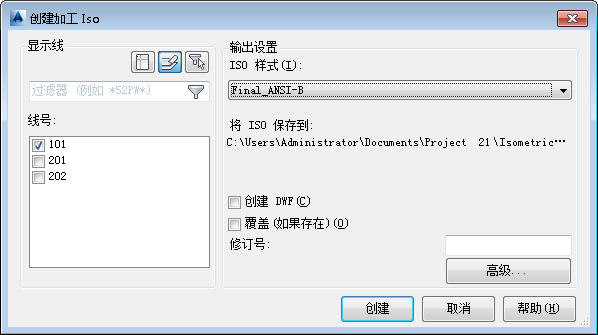
Display Lines
- Drawing
-
 Lists line numbers that are in the drawing.
- Project
-
 Lists all line numbers in the project.
- Filter
-
 Lists line numbers in the current selection set.
Line Numbers
Sets the lines to include in the isometric drawing or PCF.
Right-click in the Line Numbers area to Select all lines or Clear all lines.
输出设置
指定等轴测输出设置:
- ISO 样式
-
指定要使用的 ISO 样式。可以在“项目设置”中创建和修改 ISO 样式。
- 将 ISO 保存到
-
指定在其中创建等轴测图形的文件夹。
- 创建 DWF
-
指定是否为等轴测创建 DWF。
- 覆盖(如果存在)
-
如果选中,将使用相同的名称覆盖现有的等轴测图形。如果清除,则重命名新等轴测图形。
- 修订次数
-
设置可以显示在标题栏中的修订号。
- 高级
-
注: 选择“创建”后,在对话框的底部将显示进度条,同时显示 ISO 创建的详细信息。