Using marking by colors you can define a color for objects included in a saved query. When you need to run several queries, each query can be marked with a different color.
In order to use the Marking by colors feature in a project, you need to access the Search and mark objects dialog. You can do this in two ways:

- In the Advance Steel Tool Palette
 Selection category, click
 (Search filter).
- In the
Project Explorer, click
 (Create new query).
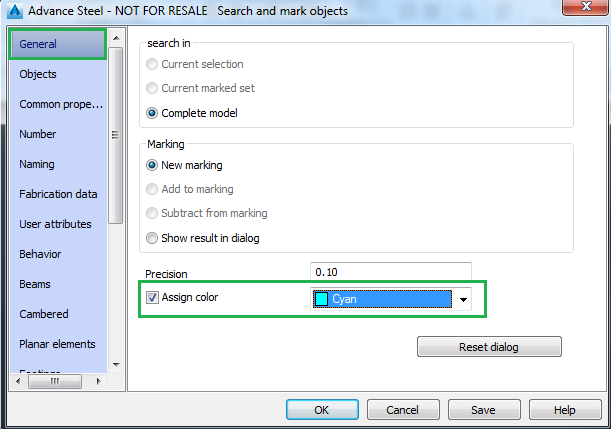
The Search and mark objects dialog appears. In the General tab, check the Assign color box and from the drop down menu select the desired color to mark the query.
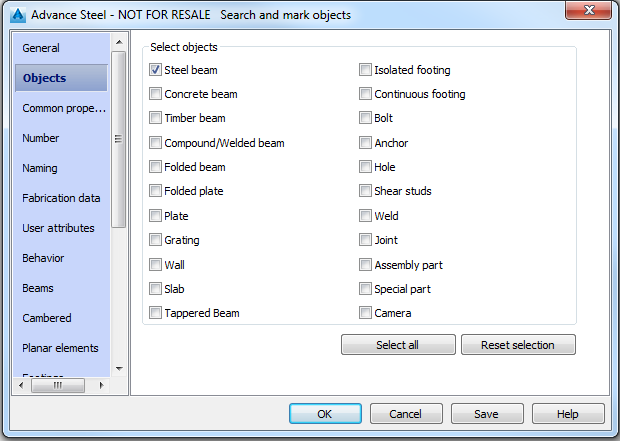
In the Objects tab, select the type or types of objects you want to be displayed in that color.
After you set the query parameters and validate all the changes, the searched objects are marked with the assigned color.
Note: If you run several queries and don't want to lose the preview markings, check the Add to marking option in the General tab:
If you want to save some queries, click the Save button in the Search and mark objects dialog after setting each query parameters. You need to provide a name for the query. The saved queries will appear in the Query section in the Project Explorer.