Learn how to configure the cut symbol resource file location and how to use the symbols in your drawings.
The cut symbol resource files are stored in the default location: C:\ProgramData\Autodesk\Advance Steel 2019\[INSTALLATION LANGUAGE]\Shared\Support\Symbols
From this location, Advance Steel will read each symbol that needs to be used in any given situation. The out-of-the-box files and the custom files need to be stored in the same folder.
Cut views can use two different symbol resources for the "up" and "down" symbols - if the two need to be asymmetrical. For symmetrical situations, the same symbol can be used for both "up" and "down".
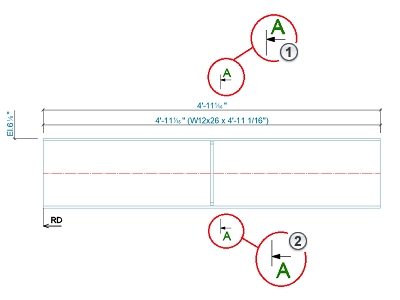
1- Cut Symbol Up
2 - Cut Symbol Down
- Go to Home tab or Tools tab
 Settings panel or Tools panel and click
 (Management Tools).
- In Management Tools, go to Defaults category Drawing-Labeling/General.
- Browse to the "Cut symbol down dwg file name" and "Cut symbol up dwg file name" defaults.
In the Property Value field of each of the two defaults write the .dwg file name for the cut symbol resource (CutSymbolUp.dwg or CutSymbolDown.dwg).
Note: If you set the same dwg file name for both defaults, Advance Steel will use the same resource file for both symbols created by the Cut View command.