In this task you will import an existing CAD model into a new project, and then orient the model correctly within the mold.
- Select
 and enter Speedo tutorial in the Project name text field of the Create New Project dialog.
 - Click OK.
- Click
 , click
  Browse and navigate to the tutorial file (typically
C:\Users\Public\Public Documents\Autodesk\Moldflow Adviser 2019\tutorials
).
Browse and navigate to the tutorial file (typically
C:\Users\Public\Public Documents\Autodesk\Moldflow Adviser 2019\tutorials
). - Select speedo.stl and click Open.
- Step through the Import Wizard and accept the defaults.
The model needs to be correctly oriented within the mold before analyses are run. Models are usually oriented so that the cavity side of the mold is oriented towards the sprue.
The model that you imported must be rotated 180° around the X axis to achieve the correct orientation within the mold.
- Click
 Bottom view on the ViewCube. The mold parting plane is in the X Y plane with the sprue entering the mold from the positive Z direction (from the top of the screen).
 Currently the open section of the model is presented towards the sprue.
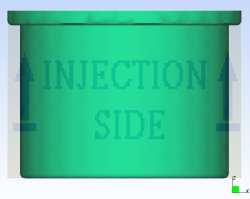
- Click
 . The Rotate pane appears.
 - Click on the model. The model turns pink, showing that it is selected.
- Select Use part center.
- Click
 Rotate X icon twice.
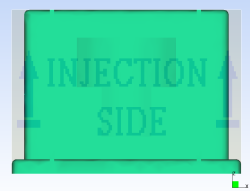
Tip: Alternatively you could have entered 180 in the X text box and clicked Apply.Note: To specify a customized angle to rotate the model, enter the appropriate values in the X, Y and/or Z text box and click Apply.The model is now oriented correctly within the mold.