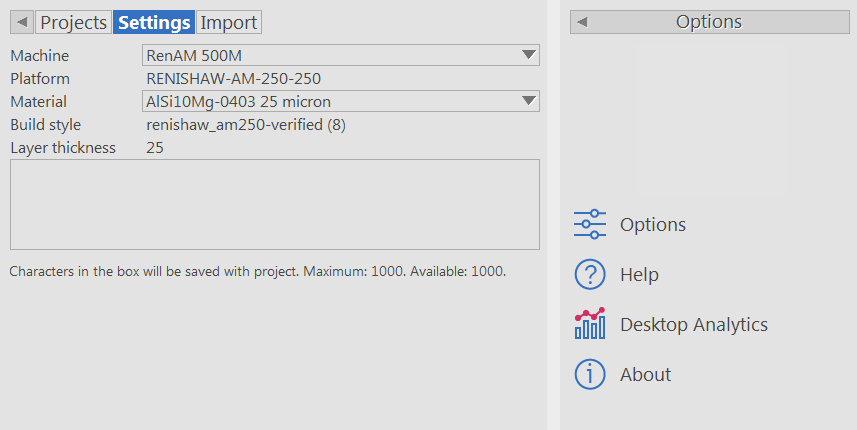
Use the Settings tab to specify the details of the machine that will be used to manufacture the open project.
- Select Queue in the Main toolbar to display the Queue page.
- In the Projects tab, select the project you want to work with.
- Click the Settings tab.
- In the Machine list, select the machine with which you want to manufacture the part.
- If the machine you selected supports multiple platforms, select the Platform you want to use.
- Select the Material in which you want to manufacture the part.
- If the machine you selected supports multiple build styles, select the
Build style you want to use.
Note: Some build styles are not available for all materials.
- Select the Layer thickness.
- In the Comment box, enter notes and extra information on manufacturing the part. Comments are not exported or used outside the application.
Use these buttons in the Options panel:
- Options to open the Options dialog and specify the settings for the application.
- Help to display the online help pages.
- Desktop Analytics to display the
Data Collection and Use dialog, which includes information about the Desktop Analytics program. The program collects information about how you use the software. To enable or disable data collection, select or deselect the check box in the dialog.
Note: Enabling and disabling data collection applies to all installed applications that use Desktop Analytics.
- About to open a dialog that displays version, build, license, and copyright information for your installation of PowerShape Utility. You can also use the dialog to open the License Manager and to display any trademarks and credits for third-party software.