Reorient parts by using surfaces and the cardinal axes as reference
You can control the orientation of parts, either to the platform or to other parts, using the Align function.
- Select the part you want to align.
- Click
Arrange >
 Align.
- To align parts relative to each other
-
- Select how you want to orient this part relative to another part. In this example we are aligning the bottom of the screw to the leaning side of the frustum of the pyramid, so we need
Translate point.
Action Effect  Align parallel
Aligns parallel, so that both surfaces point in the same direction.  Align anti-parallel
Aligns antiparallel, so that the surfaces point in opposite directions.  Align perpendicular
Aligns perpendicular, so that one surface stands on the other at a 90° angle.  Translate point
Translates two points. Click one point on each part to place them on top of each other.  Align stacked
Stacks two parts on top of each other, according to their axis’ orientation and center of gravity. - Set the distance between the two surfaces. For example, if you type 0.0mm the parts align, with a distance between them of 0.0mm.
- Click on the surface to be oriented on the first part, the screw, then click on the surface it should be aligned to on the second part, the pyramid.
The individual steps of the alignment are now listed in the tabsheet, including any
 translation that was added
- Select how you want to orient this part relative to another part. In this example we are aligning the bottom of the screw to the leaning side of the frustum of the pyramid, so we need
Translate point.
- To align parts with the X, Y or Z plane
-
- Choose the plane to which you want to align the part. In this example, the nut is leaning at an angle to the platform and we want to align them.
Action Effect 
Aligns to the X axis 
Aligns to the Y axis 
Aligns to the Z axis - Set the distance between the two surfaces. For example, if you type 0.0mm the parts align, with a distance between them of 0.0mm.
- Click the face on the part that you want to align with the selected axis.
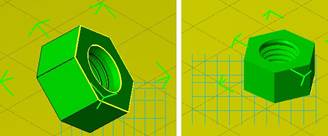
 The single steps of the alignment are now listed in the tabsheet.
- Choose the plane to which you want to align the part. In this example, the nut is leaning at an angle to the platform and we want to align them.
- Decide whether to keep the alignment changes or discard them.
Action Effect  Undo
Undo
Reverses unwanted steps one by one.
 Reset
Reset
Discards all changes so you can start again.
 Fix position
Applies the changes and stays in the alignment mode so you can make further adjustments.
Note: This clears all alignment steps taken so far. - Click Apply to accept the changes and close the dialog.