Split STL files so you can cut and scale a part before opening it. This enables you to load only a section of the part, which can save time, or scale an object before opening it to reduce its file size.
- Click
File >
 Split Large STL Part.
The STL Decomposition dialog box opens. Information about the file is shown under STL Information, including the size of the outbox, which is a cuboid space enclosing the part.
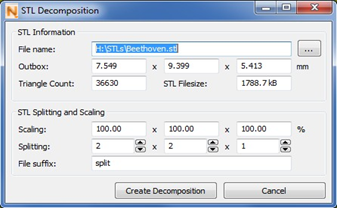
- Set Scaling percentage values along the cardinal axes.
- Enter a value for the number of split parts to create for each axis.
The part will be split into parts with equal dimensions along these axes.
- If needed, enter a suffix to be added to the file names.
- Click Create Decomposition.
The part is scaled and split according to your settings and new STL files are created, consisting only of the respective sections of the original part. The sections are saved as files separate from the original and you can open and work on them individually.
Note: This tool operates independent of the current project. After the decomposition has been created, it will close and return you to the project you had opened.