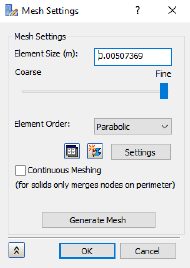
The mesh is defined using two commands. The <MeshModel> command to define the properties of the mesh and the <GenerateMesh> command to produce the mesh.
- Copy the following text:
strCmdForMeshModel = "<MeshModel AnalysisID=""1"" HasContiniousMeshing=""0"" HasMeshTable=""0"" ElementSize=""0.00507369[m]"" Tolerance=""0.000000101474[m]"" ElementOrder=""3"" HasRefinmentRatio=""1"" RefinmentRatio=""0.6"" MinTriangleAngle=""0.349066[rad]"" MaxTriangleAngle=""0.523599[rad]"" MaxElementGrowthRate=""1.5"" SuppressShortFeature=""0.02"" MinFeatureAngle=""0.0349066[rad]"" HasProjectMidsideNodes=""0""/>"

strCmdForMesh = "<GenerateMesh/>"
Element Order = 3 denotes the use of parabolic elements.
These commands are equivalent to defining the mesh properties through the user interface.
- Paste the text below the existing commands in the Edit Rule dialog.
- Press the Enter or Return key twice to jump down to a new line.