- In the Model tree, right-click on Materials and choose New.
- Change the Name to 4130 Alloy Steel.
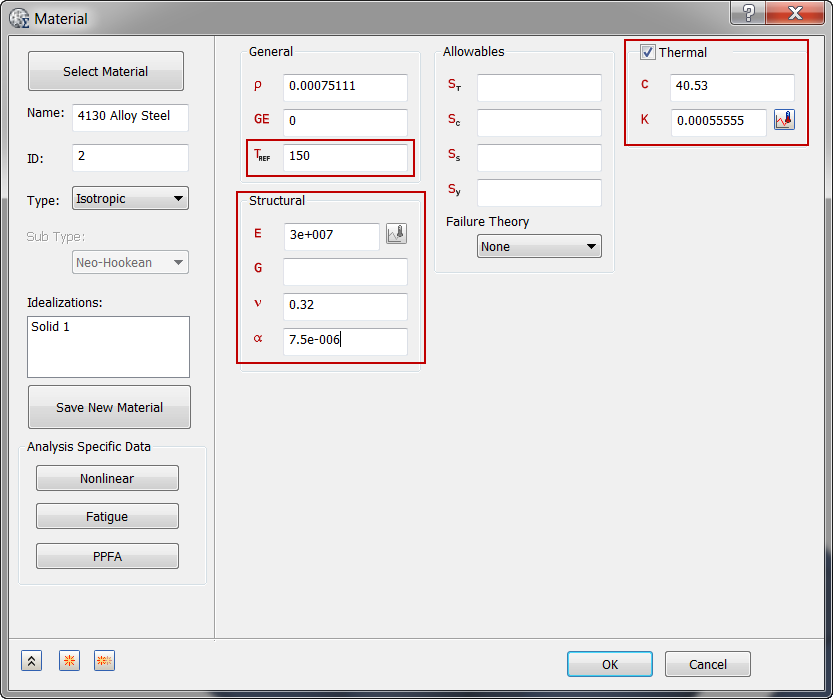
- Make sure Thermal is selected, then enter 40.53 for C (Specific Heat) and 0.00055555 for K (Thermal Conductivity).
- Then under General enter 150 for TREF (Reference Temperature).
- Under
Structural, enter the properties shown in the image below. They will be used in the Linear Static Thermal Stress Analysis.
- Click OK.
 With heat transfer analysis, the important material properties (thermal conductivity and specific heat) can be input under the
Thermal section. The mass density (
With heat transfer analysis, the important material properties (thermal conductivity and specific heat) can be input under the
Thermal section. The mass density ( ) can be input under the
General section. And there is no need to input any structural properties.
) can be input under the
General section. And there is no need to input any structural properties.