The bracket is constrained using a fixed boundary condition.
- Copy the following text:
strCmdForConstraint = "<Constraint Name=""Constraint 1"" ID=""1"" Type=""0"" CoordinateSystemID=""0"" Tx=""1"" Ty=""1"" Tz=""1"" Rx=""1"" Ry=""1"" Rz=""1"" EntitiesCount=""1"" ArrowLength=""50"" ArrowColor=""14803200"" DisplayDensity=""4"" SubcaseCount=""1"" Subcases=""1""><Entity1 GeometryType=""2"" GeometryID=""13"" ComponentName=""Tutorial 1""/></Constraint>"
Type = 0 denotes the use of a structural constraint. Each component (Tx, Ty, Tz, Rx, Ry, Rz) is defined with a value of 1, denoting a fixed boundary condition. GeometryType = 2 denotes that the boundary condition is applied on the face with an ID of 13.
These commands are equivalent to applying the constraint with the user interface.
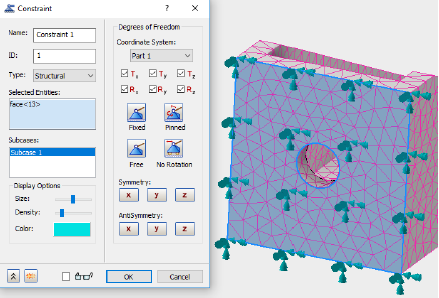
- Paste the text below the existing commands in the Edit Rule dialog.
- Press the Enter or Return key twice to jump down to a new line.