The bracket is made from a stainless steel material. With the iLogic commands, we can specify the complete material definition.
- Copy the following text:
strCmdForNewMaterial = "<NewMaterial Name=""16-25-6 Stainless Steel"" ID=""1"" Type=""0"" IdealisationIDList="""" DENS=""8504.9[kg/m^3]"" GE="""" REFT=""[K]"" EX=""19443000000[Pa]"" GXY="""" NUXY=""0.295"" ALPX=""0.00001692[/K]"" SIGXT=""77221000[Pa]"" SIGXC="""" SIGYLD="""" C="""" KX=""25.85[W/m K]"" FailureTheory_Type=""1"" HasConductivityTable=""0"" HasYoungsModulusTable=""0"" NonLinearType=""0"" SN_B="""" SN_Smu=""[Pa]"" SN_N0="""" SN_KF="""" SN_Be="""" SN_Se=""[Pa]"" EN_SF="""" EN_EF="""" EN_B="""" EN_C="""" HasPPFA=""0""/>"
These commands are equivalent to creating a material through the user interface.
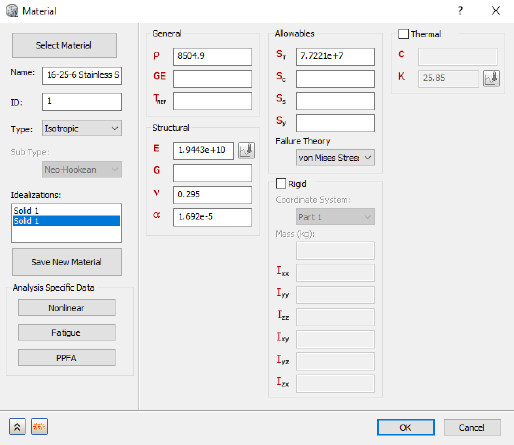
- Paste the text below the existing commands in the Edit Rule dialog.
- Press the Enter or Return key twice to jump down to a new line.